Change History for 9.1.2

Bug fixes

For more extensive changes for Dec 2022 in 9.1.1 see Change History for 9.1.1

General

  • Fixed a potential crash when closing the Preview window on Mac (9.1.1 bug)
  • Fix drill down from transaction line item to Job not initialising job entry window properly (and potentially crashing on Windows)

Server

  • Fixed Mac Datacentre false alarm alerts for Backup and Archive paths outside the server’s home directory on some versions of macOS
  • Repair blank document root path condition on Mac server

Scripting and Automation

  • Updated Type Library format for COM/OLE support for 64-bit Office on Windows (with 64-bit MoneyWorks Gold). Previously only 32-bit Office was supported.
  • Fixed potential crash responding to VBS request with a bad type (Windows)
  • Fixed potential crash in scripted edit list on Ventura when the script triggers a progress dialog while building the list

🌻

Posted in Change History | Comments Off on Change History for 9.1.2

Change History for 9.1.1

General

  • Purchase Orders: Receive Prepayment Invoice for Goods – no longer spuriously requires serial numbers for serialised items
  • Added Dispose icon to Assets toolbar
  • Singapore GST changes: Support for reversed GST, and new default rate table for new documents. Note that for existing documents, you will need to update your rates in your tax table.
  • Fixed selection leak from report editor syntax checking and some user-specified searches
  • Processing a foreign currency PO to a pre-payment invoice now allows the exchange rate to be set on the prepayment invoice
  • Startup check that system date format is parseable (macOS cannot parse its own date format if you use ISO calendar with 2-digit year (2 digit year is not permitted in ISO date format standard))
  • The per-user Reply-To override option for SMTP now works again (it disappeared in the changeover from the external sendemail tool that v8 used)
  • Added batch expiry date column to Detailed Stock List report
  • Fixed problem with Bank Feed importing when multiple Load Bank Statement windows are open
  • Fixed cosmetic issues with Preview drill-down highlighting on Windows
  • Fixed display of current page number in Preview on Mac
  • Report editor cells: Renamed “Product Image” cell type to “Image”. You now load transaction and asset images using the Image cell type. Added tips to the Cell Display setting.
  • Fixed issue with product build where BOM contains batch-tracked items with small fractional quantities
  • Note: Documents opened with 9.1.1 will no longer be accessible using earlier versions of MoneyWorks 9 (but why would you want to?)
  • SMTP emailing: missing recipient address is now reported as such instead of “Failed sending data to the peer”

Server

  • Critical server alerts: The server will now email the server administrator (as configured in the Console), if a critical error such as a backup failure occurs, or if the server is running low on disk space. Disk space warnings are sent at midnight(ish) when the service restarts
  • The Logging and Backup controls have been moved to their own tabs in the Console
  • Reinstated auto-install/auto-update of MoneyWorks Gold on Mac servers, because it is actually required for correct operation of the CLI
  • New option to reduce frequency of Pictures backups to once a week (since they can greatly increase the size of backup files)
  • Improved backup logging
  • Show file and Show log now work when the document root is just a drive letter (Windows)
  • Account changes now record the Who field in the log table
  • Statements for a selection including branches no longer omit the branches when rendered on the server
  • Fixed a couple of (rare) server crashes after database shutdown (including disconnected client reconnect attempt during shutdown)
  • Fixed issues with Console warning icons
  • Fixed problems with REST worker throttling after failures
  • Improved REST parameter sanitising

Scripting

  • Fixed incorrect result for IntersectSelection on a sorted selection with a single-term non-indexed-field search expression
  • Scripting Privilege no longer required to receive commands from appleevent/COM
  • UpdateOrderLines (orderSeq, prod_qty_array [, linktoInvSeq]) – can now get the linked invoice behaviour with no linked invoice by passing -1 for the invoice sequence number
  • Fixed landscape PDF form rendering via CLI/REST
  • Fixed issue with DoForm() with blank format
  • Specific handler names for the transaction list now use XX as the type specifier when the type is ambiguous (it used to be ?? which was not valid in a handler name so you could not use it)
  • GetTaxRate function can optionally return the reversed rate
  • The Mail() function now behaves better with Outlook on Windows if the message parameter contains newlines
  • Clicks() function now resets when a window opens or closes
  • GetWindowByID() function now favours the topmost match if there are multiple instances of the window that match the ID
  • The search expression passed to the DoForm() function may now reference the caller’s in-scope variables
  • The DoForm() function now allows preview output of INVC forms to be pre-addressed for emailing by passing a contactRole parameter (either a numeric bitmask indicating which contact role(s) to add to the mailto) (this previously only supported STMT forms). Additionally, you can use a textual role name instead of a numeric bitmask for the contactRole parameter.
  • Script editor sidebar action menu available via right click in the sidebar
  • Script editor: Delete script can be used with multi-row selection
  • Two extra scriptable buttons (B_BUTTON2 and B_BUTTON3) on the Build window
Posted in Change History | Comments Off on Change History for 9.1.1

Datacentre Email Alerts

Because MoneyWorks Datacentre runs as an unattended server, critical error conditions need to be brought to the attention of the server’s administrator. This is done by emailing the administrator. You do not need to configure outgoing email; the email will be sent from a service at moneyworks.net.nz.

Why am I getting the alerts? or How do I get alerts?

You will receive the alerts if your email address is the registered administrative email specified in the MoneyWorks Datacentre Console app on your server (Datacentre v9.1.1 and later). Your server will also need to be able to make outgoing HTTPS connections to our server at cognito.co.nz.

You can enable or disable alerts using the Send critical server alerts checkbox.

You should fix the cause of the alerts rather than turning off alerts.

A critical error (such as a failure to save a backup) will result in an immediate alert.

Disk space warnings are sent nightly.

What should I do about a backup error alert?

The server may alert you when a backup fails for any reason, but it will also alert you to potential future failure if the backup volume is running low on space. You can specify the minimum free space threshold for alerts in the Advanced tab of the MoneyWorks Datacentre Console.

What should I do about a data volume or boot volume free space alert?

Make sure your server has sufficient free space at all times. As users add data (and possibly upload images) to your server, free space will be consumed. As new periods are opened, monthly archive copies of the latest backup will be copied to the Archives folder. Running out of space on the data volume or boot volume can result in data loss. Do not let it happen.

The default threshold for an alert is 3000MB. If your storage volumes have less than that, you will get alerts every night. You can change the alert threshold to a lower number to stop the alerts until the new threshold is reached.

Note — False alarms on newer macOS versions — backup locations outside of the MoneyWorks home directory were giving false alarms (claiming that a valid backup storage location is not found) on some macOS versions. Please update to v9.1.2 for fix.

Quick troubleshooting tips

The server’s configured backup/archive location (X:\path) was not found

Make sure the path name is correct and exists. Make sure the drive has not been unmounted. On Windows, do not use a drive letter than is mapped from a network drive—use the proper UNC network path. Drive letter mappings of network shares are only visible to you; they don’t exist for a service.

Posted in Uncategorized | Comments Off on Datacentre Email Alerts

Microsoft Outlook and Drag-and-Drop

Most email programs support dragging attachments directly as files from an email message into other applications. In particular into the image attachment icon in a MoneyWorks transaction to archive an invoice PDF or JPEG.

The exception is Microsoft Outlook, which won’t directly deliver a file when you drag an attachment’s icon. However there is a workaround:

On Windows: This Outlook extension fixes Outlook’s drag functionality to allow attachments to be dragged to any application, including MoneyWorks.

On Mac: To copy an attached image file to a MoneyWorks transaction, double-click the attachment — this will open it in Preview. Now click on the small icon in the Preview window title bar and drag that into MoneyWorks and drop it on the Image attachment icon of the transaction entry window.

Posted in FAQ, Tip du Jour | Comments Off on Microsoft Outlook and Drag-and-Drop

Printing on Windows; There must be a printer driver available even if you are not actually printing

When MoneyWorks generates reports or forms, it queries the system’s printing system for localised page sizes. For this to work, there must be a printer driver available to provide that information. Usually, on Windows 10, even when there is no attached actual printer, there will be at least Microsoft XPS and Microsoft Print to PDF devices available, but if someone has removed all printer devices from your Windows system, then Printing, Previewing, and all other formatted output from MoneyWorks may fail.

In this situation, the solution is to re-add a printer device.

The following link explains how to re-add the Microsoft Print to PDF driver if it is missing.

How to Add or Reinstall the Microsoft PDF Printer 2021 Edition

The short instructions, for an up-to-date Windows 10 installation, are:

1. Open Cmd.exe with Administrator privileges.

2. Enter (all on one line)

dism /Online /Disable-Feature /FeatureName:"Printing-PrintToPDFServices-Features" /NoRestart

then

dism /Online /Enable-Feature /FeatureName:"Printing-PrintToPDFServices-Features" /NoRestart

Posted in Uncategorized | Comments Off on Printing on Windows; There must be a printer driver available even if you are not actually printing

Simple Document Management

If you are an engineer, accountant, manufacturer or similar you might have a folder of files that pertain to a particular product, client, job or similar. These files won’t be anything to do with MoneyWorks, but might be word documents, spreadsheets, CAD files, photos etc.

Assuming these are all stored within a single Master Folder (or, more likely, within subfolders within a single Master Folder), you can, with the free MoneyWorks Document Management script, have instant access to those folders from within MoneyWorks Gold (or Datacentre), or MoneyWorks Now (MoneyWorks version 9.1 or later required).

The Document Management script inserts a button on the client, product and job screen which, when clicked, opens the relevant sub folder, giving you instant access to the other files. The master folder might be on a file share and accessible by numerous users.

The Folder button will open the linked folder of documents

If you haven’t been sufficiently organised to have a master folder (but it has been on the “to do” list for a while), you can create one outside of MoneyWorks, and then have MoneyWorks automatically create subfolders when required for a specific customer/product/job.

How it works.

When installed, a Folder button appears at the top right of the Customer, Product and Job entry windows. The first time this is clicked on a particular computer, you will be asked to select the Master Folder (using the standard Mac or Windows file select window). This is stored per computer, as the path might be different from different computers (for example if you have both Macs and Windows machines sharing the same folder).

Once the master folder path has been specified, you can link a customer/supplier, product or job to a folder within the master folder.

To link, open the entry window for the name, item or job, and click the Folder button at the right hand side of the entry window (the button does not show when you are creating a new record).

  • If there is already a link, the folder will open in Windows Explorer or, if using macOS, the Finder.
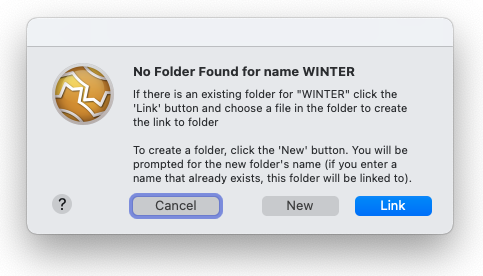
  • If there is no link, you will be prompted to either link to an existing folder (which must be in the Master Folder), or to create a new folder.
  • Clicking the Folser button

    • If you select to Link to an existing folder, the standard File Open window will be displayed. Navigate to the folder and select a file within it (you will not be able to link to the folder unless you select an item, so you cannot link to an empty folder).
    • If you select New Folder, you will be prompted for the folder name (the default is the name/product/job code) which will be created at the top level of the Master Folder. If a folder of that name already exists, it will link to that.

The file paths for each linked record (relative to the Master Folder) are stored in MoneyWorks. If you change the name of a linked folder, or move it to a different location, the link will be invalid. When you click the Folder button and there is an invalid link, nothing will happen (you need to repair the link using the Reset option).

Viewing and Resetting a link

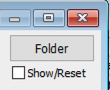
You can view a link by turning on the Show/Reset checkbox. The existing folder link (if any) and the Master Folder link are displayed in a yellow coach tip.

When the Show/Reset checkbox is on, the Folder button is replaced by a Reset button. To reset a link, or to change the Master Folder link, click the Reset button and follow the prompts.

Note that changing the Master Folder to an entirely different directory will break all the links (which are stored as relative paths to the Master Folder).

Installing the script

The Document Management script is available as a free download from the MoneyWorks Add-on store. Having “purchased” the script, you will receive an email with the download link. When downloaded, simply double-click the “Document Management.mwxml” file to install it in the currently open MoneyWorks file (other users will get the script the next time they connect).

If you subsequently decide the script is not for you, you can disable it or delete it in Show>Scripts.

Tweaking the script

For simplicity, there are no preferences for the script settings. By tweaking the script slightly you can remove the button from any of the name, item or job entry screens, or set it to automatically create subfolders when you create a new linked folder (for example, for a linked manufactured product record, you might want subfolders for “Drawings”, “Notes” and “Costings”).

To tweak the script, open it in Show>Scripts. Comments in the first few lines tell you how to tweak it.

Posted in Resources, Scripts | Comments Off on Simple Document Management

Change History for 9.1

20 Sept 2022

additional fixes for 9.1r2 supplementary update at end

  • Date Picker
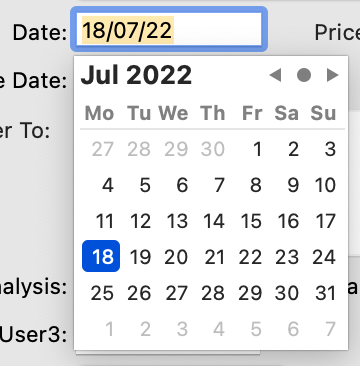
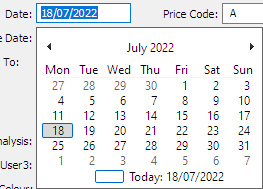
  • By popular request, date fields now feature a pop-up calendar date picker. This allows dates to be typed normally (and the calendar will reflect what you type), or you can click a date to enter it into the field. Note: You can enable or disable the date picker in the MoneyWorks Preferences → General tab.

             
    Mac
     
    Windows
  • On Windows, there is now an option in the Window menu to “Always open windows on main screen”, which is on by default. If you want modal and floating window positions on different monitors to be remembered, you will need to turn this option off
  • Tax numbers for different locales can now be specified in the setup part of the respective Guide form
  • VAT Guide UK: Fixed to correctly include EU/Northern Ireland Purchases
  • Tax by Currency report now checks for missing tax numbers
  • Build Product now supports BOMs that use serial- or batch-tracked parts and/or create serial- or batch-tracked built products. The BOM is expanded to allow all serial numbers to be specified prior to creating the build journal
  • Serial-tracked parts can’t be added to a BOM for an auto-built product. Turn off auto-build to add serial-tracked parts
  • Tax by Currency report now handles overpayment refunds
  • Customer payment method is now available for non-Debtors
  • MacOS Ventura compatibility for speech output
  • Account list was incorrectly showing the tax code column when initially displayed for documents where GST/VAT processing was turned off
  • Entering a date as only m/d when the system date format is middle-endian-with-alpha-month-names now works as (presumably) expected
  • Fixed a problem with drag & drop recognising .qbo files on Mac
  • Fixed a rounding issue with 50/50 split rules in bank statement import
  • Changing the Name code on a cash transaction imported from a bank statement will preserve the gross value of the transaction if the tax code changes as a result
  • Fixed multi-user concurrency issue with modifying the same filter rule simultaneously
  • Fixed high CPU usage in background when a coachtip or tooltip is scheduled to appear
  • Fixed memory leak when traversing APFS folders
  • Removed some spurious diagnostic log messages
  • Asset Report: Highlighted Only option now works correctly
  • Asset Register Report: Show correct bookvalue for asset purchased on last day of period
  • Asset Register Report: Fix acquisition quantity
  • Bank Balance report: Reinstated grand total
  • Added diagnostic mode to the SMTP preferences. Hold down the shift key when clicking Test to get a full log of the SMTP test session
  • Fixed address book import and email autocomplete on macOS versions later than High Sierra
  • Fixed SMTP emailing to multiple addresses for a role
  • Fixed incorrect cursor for certain drag operations
  • Fixed pinch zoom direction in Preview (Windows)
  • Enabled pinch zoom in Forms Designer
  • The Exclude Zero Qty Lines option in Product History no longer erroneously applies to Pending view
  • Fixed update issues in Analysis editor
  • Timesheet Location field is now reliably validated
  • Detailed Stock Report: Add Highlighted Only option
  • In future, Software Update on Mac will quit other instances of MoneyWorks for you. This is to prevent mysterious file system errors that can be experienced by a process whose executable has been replaced with a new version
  • Trial Balance Report: Option to show closing balances only
  • Stock History Report: Currency conversion issue with negative creditor invoices
  • Add Path button in the Scripting Preferences to select a folder to add
  • Fixed incorrect Accounts List toolbar when GST processing is turned off in document
  • Fix to Cash Projection report
  • Updated calendar holidays
  • Asset Register: Allow revaluation of Non Disposable Assets

🌻

Server

  • Addressed restart/recovery race condition on server
  • Ventura compatibility: Updating Datacentre on macOS Ventura and later launches the GUI installer app to complete the update install
  • Mac Datacentre Console no longer auto-installs/updates MoneyWorks Gold on the server. If Gold is installed on the server, just connect to the server to update it
  • Datacentre Console now gathers Mac crash logs when necessary
  • Fixed Datacentre installation failure on virgin Monterey OS (not upgraded from previous OS version)
  • Fixed potential server deadlock after certain SSL connection failures
  • Other stability fixes
  • Remove excessive logging for syntax errors in users’ custom column expressions
  • Updated paths for jpegoptim and ghostscript for serverside image recompression

🌻

Scripting and Automation

  • Adopt WKWebView for embedded web views on Mac; this provides script-based webviews with access to latest WebKit and Nitro Javascript. See New web views in MoneyWorks 9.1 and later for more information
  • Adopt WebView2 for embedded web views on Windows (where installed); this provides script-based webviews with access to the Chromium/Edge browser engine instead of the IE11 browser offered by IWebBrowser2. See New web views in MoneyWorks 9.1 and later
  • Using the new web views, you can now call out to MWScript from Javascript in a web view’s content. You can also inject javascript into a Web view’s content from MWScript. See Communicating with Javascript in a Web View
  • Fixed assignment to window bounds properties
  • Fixed crash with extremely long array keys
  • Fixed potential crash when SetFieldValue is used in bulk and results in a progress dialog
  • Improved REST error reporting
  • Added Regex_SearchStr returns the first matched substring or empty string if no match
  • Added Regex_GetMatches returns an array of tokens matched by parenthesised subexpressions in the regular expression
  • Improved regex error reporting
  • Reduced threshold of regex_complexity error on Windows
  • HexDecode no longer enforces output being valid utf-8. This is to facilitate re-encoding binary data such as the output of HMAC as Base64
  • GetWindowProperty now returns NULL if the property is not found, rather than throwing a runtime error
  • LoadPicture now displays “PDF” on Window when a PDF was loaded from the server (Windows cannot display PDFs)
  • Timestamp() added TSF_Unix, TSF_Unix_ms, and TSF_Unix_us formats for Unix epoch decimal timestamps
  • Timestamp() format parameter may now be a strftime format string
  • DateToText() format parameter may now be a strftime format string
  • Added ModalTransactionWindow function to invoke a standard transaction entry window modally
  • Added CreateFolder to create a folder
  • Added AddSafePath function to invoke the preferences for user to add a safe path
  • Implementing the same handler name twice (where the first implementation has a non-empty handler body) is now flagged as an error when you do an explicit compile in the Script Editor. In order to not break existing scripts that might have this issue, this error does not prevent existing scripts from compiling at load time. The script will need to be fixed (by removing the earlier extraneous handler definition) when it is modified in the Script Editor
  • Fixed potential crash when SetFieldValue is used in bulk and results in a progress dialog
  • Built_In:__SendSMTPMail now has the option to add multiple attachments by passing an array of paths instead of a single path string

9.1r2 — 4 Oct 2022

General

  • Fixed randomly auto-cancelled Print command on Windows
  • Increased network timeout for Open New Period to better accommodate very very very very large charts of accounts

Scripting

  • Fixed and intermittent crash when closing custom script windows

9.1r1 — 30 Sept 2022

General

  • Fixed a Daylight Saving glitch in the Mac date picker affecting timezones more than 12 hours ahead of UTC
  • Fixed crash when attempting to output a report or form on Windows when there are no printer devices available
  • Navigator panel will now reload if you drill down to overdue debtor or creditor invoices
  • Fixed a resource leak in the Edit Filters command

Scripting

  • Fixed crash when putting up a print spool dialog from a PostedTransactions handler on Windows (although doing this kind of thing from a PostedTransactions handler is absolutely not recommended)
  • Fixed the “open links in external browser” option for WebViews on Windows
  • DoForm() function with non-existent form no longer produces an empty PDF file. The output path will now begin with “[ERROR]”. You should test for this rather than assuming that the path identifies a valid PDF output file
  • The Mail() function will fail with an alert if the attachment path begins with the text “[ERROR]”
Posted in Change History | Comments Off on Change History for 9.1

Fixing window and column sizing problems — window doesn’t fit on screen

If you find that a window in MoneyWorks is opening with too large a size and does not fit within the MDI frame window (on Windows), or is extending off the screen, this may be due to customised column widths in a list in the window being too wide (perhaps they were set when the document was used on a computer with a larger monitor).

How to fix:

  • On Mac, hold down the option key when opening the window
  • on Windows, hold down Control and Shift when opening the window

This will open the window with a default size and position, and will reset customised column widths.

If you are using an older version of MoneyWorks, you might want to consider upgrading to the latest version. MoneyWorks 9 has much better support for multiple monitors and screen resolutions, especially on Windows.

Posted in Uncategorized | Comments Off on Fixing window and column sizing problems — window doesn’t fit on screen

Change History for 9.0.9

27 June 2022

9.0.9r2

  • Fixed failure to import small XML files on high-latency network connection
  • F5 Report: Was incorrectly calculating Box 3 (Singapore)
  • Detailed Stock Listing Report
  • Fixed crash with open(1) with a moneyworks:// scheme url identifying a server folder (Mac)
  • Bank Balance Report: Resolved rounding issue with large Forex balances
  • Fixed initial Account list column format when GST/VAT processing is disabled for the document
  • Print setup dialogs are scriptable

9.0.9r1

  • Fixed a problem in the search optimiser in 9.0.9 that broke some date searches in reports
  • Fixed a 9.0.9 crash in the MWScript Ask() function

🌻

  • Import with update product/name control accounts was broken in 9.0.8
  • Stocktake list report
  • Bill of Materials Costing Report: Sometimes used buy price instead of average unit value
  • Asset Register: Fixed depreciation of assets in period of purchase if purchased on last day of period
  • Asset Register: Fixed issue with departmentalised asset disposal account
  • Parsing of Yodlee data is much faster
  • Fixed opening PDF files (manual/tutorial) on Monterey 12.3
  • Importing transactions: Transaction.promptPaymentDisc % field is now set as a side effect of setting promptPaymentAmt via work-it-out
  • Option to autobuild out-of-stock BOM products when requisitioning for a job (see the Job Costing Preferences panel to turn on this option)
  • Fixed Windows save file dialog sometimes not showing the locations sidebar
  • Simultaneous Process+Print of SO by two different users could result in both invoices being printed by one of the users
  • MoneyWorks for Windows is now built against the Windows SDK v143 from Microsoft. This SDK does not support Windows 8.0 (it does support Windows 7). If for some reason you are still running Windows 8.0, please update to the Microsoft-supported “Windows 8.1 Update”, or, preferably, Windows 10
  • Fixed Stock Enquiry Sum Selection for Pending Purchase Orders incorrect results
  • Fixed crash with Aged Debtors invoked from 64-bit Gold client on Windows when connected to a server
  • Addressed modal and floating window positioning issues on Windows with multiple monitors
  • Detail.Account work-it-out when importing a purchase of a stock item for a job, will now insert the expense account instead of the stock account for the item (the same as you get when manually entering such a purchase)
  • Plugin zipping will no longer add ._ files from Mac file shares on Windows
  • Fixed a potential crash in the Lookup() function
  • Added sign setting for CSV statement importing
  • Improve traversal of “notwork security” packet inspection proxies for software updates and web services on Windows

🌻

Server

  • REST read-only polling when file is not otherwise in use could result in the latest backup being removed
  • Fixed potential deadlock during dropped-connection recovery
  • Windows Console software update browser now supports modern CSS
  • IP blocklist facility to drop unwanted connections by IP range
  • Default blocking of egregious portscanners
  • Fixed incorrectly formed Recent Items link after logging into a non-ASP Datacentre with an email address as a username
  • Small data imports (<2K) will no longer run on the server (prevent extreme server load from iBodyShop)
  • Searching for timestamps now works reliably when the server’s service locale does not use d/m/y date format

🌻

Scripting

  • New JSON parser (500x faster)
  • JSON_Parse correctly interprets \uXXXX where XXXX is non-ASCII UTF16 (9.0.8 only fixed this on Mac; Now works on Windows)
  • Fixed formatting of very large integers (such as JSON numeric IDs)
  • Leaked object handles are now logged when a script is unloaded
  • UpdateOrderLines allows linking to unposted invoice
  • UpdateOrderLines now clears the order’s ShipQty in invSeq linking mode
  • SetProgressMessage is now per-script
  • foreach loop bounds range may now be larger (64 bit long long int instead of 32 bit)
  • foreach loop bounds generates an error when out of long long range
  • spurious “overriding intrinsic” warning is no longer given for ‘uses’ statements
  • Runtime errors no longer auto-unload the offending script (9.0.8 change). As well as a potential circumvention of business rules, this was causing additional instability even after recompiling the script—in particular window handles would not be passed as parameters
  • CURLOPT_CERTINFO/CURLINFO_CERTINFO to capture and retrieve full certificate dump from a TLS connection
  • Loading external script packages with LoadScriptFile is now logged
  • ItemHit handlers for editable list cells may now have more detailed specific naming (down to the column name of the active cell) and will receive additional parameters (namely the list handle, the current row number, and the current column number). e.g. on ItemHit:F_TRANS:L_LIST:DI:Location(winRef, listId, listHdl, rownum, colnum) for an ItemHit handler that responds only to kepresses in the location column of Debtor Invoices. Note that for the transaction entry form, you must supply the type specifier. Note also that due to backwards compatibility, the list is identified by its underlying identifier L_LIST rather than a tab name like By_Item. This does have the benefit that you can respond to, eg, the job column in either the By_Item or By_Account tabs using the same specific handler
  • Fixed display of popup idents in the UI editor
  • Fixed the ModalListWindow() function on Windows which incorrectly instantiated an MDI window instead of a top level window, resulting in UI lockup
  • The Alert function now recognises an empty string button name as “no button” on Windows for the second and third buttons. You can also use NULL if you need to pass all button parameters to specify the timeout parameter
  • Curl_Exec on Windows will add CURLSSLOPT_REVOKE_BEST_EFFORT | CURLSSLOPT_AUTO_CLIENT_CERT options to curl requests by default. Without these, packet inspection proxies will typically not be traversed. If you do not want this security downgrade on your client, you can set the strictRevocationCheckinginCURL registry key in the MoneyWorks Preferences to 1
Posted in Change History | Comments Off on Change History for 9.0.9

Change History for 9.0.8

22 Mar 2022

  • Fixed issues with 9.0.7 BAS Guide (spurious zeroes on box G11, box G1 not including GST Free Sales)
  • Support for mapping tax codes to foreign tax guide codes. See Paying GST/VAT in Multiple Countries
  • Available Shopify support
  • Available BigCommerce support
  • Available WooCommerce support
  • Product Sales Enquiry: Fixed various cosmetic issues
  • Product Sales Enquiry: Fixed various cosmetic issues
  • Product History: option to exclude zero qty lines
  • Customer Sales Enquiry: unposted setting is respected in movements list
  • Product Sales Enquiry: support include unposted on network
  • Email subject lines can now be pinned and stored for re-use
  • Save a Copy as Clone: Now includes asset categories
  • Pre-installed holidays now work on APFS and Windows
  • Stock transfer journals now auto-split lines to streamline entering serial numbers for created stock
  • Credit notes now respect quantity price breaks
  • Age by Due Date Report now omits cancellations
  • Autocomplete email addresses is now less aggressive
  • Prepayment deposit lines no longer omit tax codes when the deposit control account includes a department
  • Importing Job Sheet items – the type (IN/EX) may now be explicitly specified instead of relying solely on the sign
  • A negative stock purchase (return) with a discount no longer generates a spurious stock/cogs adjustment
  • When updating MoneyWorks, the std scripts are now replaced rather than merged. Don’t keep your own scripts in the std scripts folder
  • Fixed potential double & in Asset Category code popup on Windows
  • MoneyWorks will now post warning messages when document size approaches the maximum size (4GB)
  • Fixed a random crash on startup related to progress dialogs and software update check
  • Period numbers can be shown in the Period Maintenance dialog (hold down the Shift key)
  • Name.WebURL was allowing too many characters to be entered (field size is 63 chars)
  • Fixed some pixel alignment issues in budget spreadsheet window
  • Unposted cash transaction stock movements now show in Stock Enquiry with Include Unposted
  • Product importing no longer spuriously sets multiple price flag when updating existing products
  • More informative progress messages on clients when retrieving data from the server
  • Bank feeds: Yodlee Fastlink 4 — Localised default banks for New Zealand
  • Fixed software update download progress display when downloading manual
  • Fixed software update temp files being left behind
  • Statement importing: Coding a transaction to the same bank the statement is for is now flagged as an error

🌻

Scripting fixes and additions

  • Allow scripts to use intrinsic function/global names as handler/local var names. In this case the local identifier will hide the global one. The declaration will be coloured purple by the syntax colouriser
  • RemoveLeading and RemoveTrailing functions to truncate the beginning or end of a string
  • GetFieldValue on a period popup: pass true as third parameter to decode to period number
  • UI editor: popup control idents and z-order now redraw properly
  • UI editor: fix crash on Monterey when showing idents
  • Script editor: autocomplete window was not wide enough on Monterey
  • UI editor: prevent resizing objects to a negative dimension
  • UI editor: tab control selection frame+resize handle now show on Windows
  • UI editor: popup control selection frame+resize handle now shows properly on Mac
  • Installing scripts from .mwxml: better progress logging
  • Navigator() function may now be used from PostedTransactions handler (it executes asynchronously)
  • Fixed double & in popup menu controls on Windows
  • Removed unintended 32K length limit on concat and syslog functions
  • AppendPopupItems now interprets ( item prefix as disable this item (per documentation)
  • Fixed Mac script editor not deactivating when in background
  • Fixed potential crash if a script is called from a custom list column
  • JSON_Parse now correctly interprets \uXXXX where XXXX is non-ASCII UTF16 (update: this only got fixed on Mac; Windows fix coming in 9.0.9)

🌻

Server

  • In ASP mode, the server now logs any folder login attempt
  • enableReconnections was not being maintained properly in the conf file
  • HTTP GET on the DC port now gives a 418 error
  • Console now flushes folder settings on exit field (in addition to changing list selection)
  • Correct reporting of certain REST request errors as 4xx or 5xx as appropriate
  • Changed the config variable name for verbose logging so that it gets turned off when updating. Do not turn it on verbose logging unless Cognito support asks you to
Posted in Change History | Comments Off on Change History for 9.0.8