Change History for 8.1.3

7 May 2018

  • New Stock transfer journals may now be imported. The importer expects a non-product contra detail line to populate the contra field (do not import the contra account into the contra field—journals do not use that field).
  • New Having the user’s email address override the Reply-To when sending email via SMTP is now optional. This is particularly relevant to MoneyWorks Now users who are obliged to have a user email address. You can turn off user email reply-to substitution on the user record in Users & Security
  • Fixed some inconsistency in word wrap in reports between server- and client-generated reports (Windows server)
  • Fixed sign-adjustment when switching between Writeoff and Transfer journal
  • Opening report in Excel now works when the report title contains a $ character (Windows)
  • Exporting a report to text no longer applies hard word wrap in cells
  • Replace may now be used on Job.EndDate
  • Fixed crash in XML import when XML file begins with a utf-8 BOM
  • File → Import → XML now reports any errors rather than failing silently on errors
  • Account Enquiry movement list now shows transaction colour (single-user mode)
  • Payments History All list now sorts as it claims to be
  • Payments History All list no longer gets a Sequence Number Mismatch error when you drill down and change the value of the indexed field (typically date) that the list is sorted by
  • Stock Enquiry now shows lines from transfer journals
  • Build Product no longer resets the found set in the products list
  • New Audit → Backdated Transactions report: New option to show prior year transactions and posted
  • Age by Due Date Report: Corrected for case of future periods being open already
  • Fixed Period Name/Year Name corruption in files that were originally created from an Empty Clone of an older file
  • Fixed GST Report crash with 5-character tax codes
  • Fixed pasting of multi-line text from external editors into Script Editor on Windows
  • Fixed crash in WriteCurrentRecordForWindow() function when second parameter is not of the correct type
  • New GetActiveListColumn(listRef) function to determine which column of an editable list has keyboard focus
  • New GetActiveListRow(listRef) function to determine which row of an editable list has keyboard focus
  • Relational sort on a target field smaller than 4 bytes now works again (broken in v8)
  • Fixed cosmetic issue in Login dialog when switching between login modes with more options shown
  • Fixed spurious logged error on Datacentre whenever a REST request caused a document to be opened
  • Auto Allocations: Fixed multisplit allocations of non-percent values
  • Ledger Report: Fixed run time error when run for periods where there is no data
  • New GST on Prescribed Goods: invoice form (Singapore)
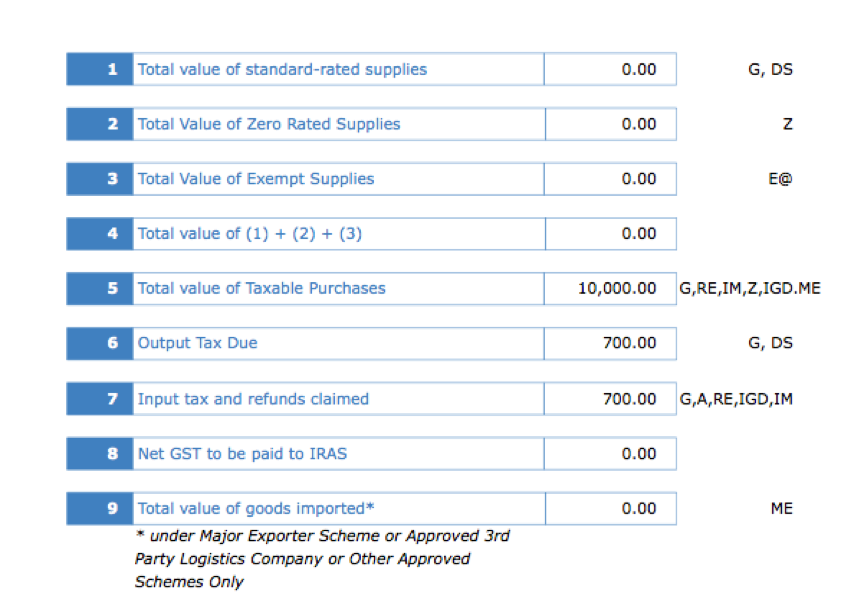
  • New GST on Prescribed Goods: Modifications to F5 and Tax Table (Singapore)
  • New South African VAT rate increase from 14% to 15% on 1 Apr: updated default rate table for new documents (South Africa)
  • Datacentre subscription: Revalidate button now reports error if the subscription server cannot be reached due to firewall or outdated operating system security (TLS 1.2 support must be enabled on old versions of Windows to support subscription-based licensing)
  • V7 file conversion no longer truncates description fields longer than about 750 characters
  • Stock Transfer journals now always post at the current average unit value
  • Fixed crash when starting a new MoneyWorks instance via AppleEvent while the current one is converting a large v7 file
  • Fixed buffer overflow in batch debtor receipts with very long (imported) customer name
  • Customer/supplier names up to 255 characters now supported
  • fixed a typo in the user entry dialog
  • Stock On Order displays now more consistent (previously relied on expected receive qty rather than order qty less previously received qty)
  • Updated OpenSSL to version 1.0.2o
  • Fixed window layering issue on Mac with Import Budgets
  • No longer include OTF fonts in font menu on Windows because they do not work with PDF generation
  • Fixed a crash in the report part editor dialog
  • Report maximum line length increased
Posted in Change History | Comments Off on Change History for 8.1.3

Reporting on GST for new customer accounting for prescribed goods (Singapore)

Requirements

GST F5 report in MoneyWorks 8.1.2 or later

Setup

  1. Create a All GST tax code
  2. Create a GST tax code called CAG to be used with prescribed items for customer accounting
  3. Create a general ledger code called GST Adjustment, assign it to ALL tax code and create an item also called GST_ADJ and code the Purchase (tick We buy it) account to GST Adjustment general ledger

Data Entry – Creating purchase invoice or payment By Item

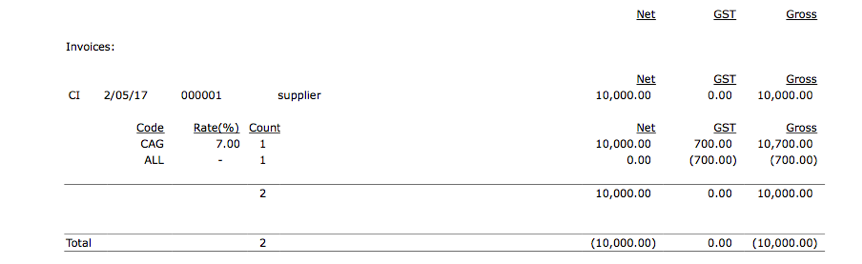
  1. Enter the prescribed item as normal (including tax etc) replace the tax code to CAG (instead of G)
  2. Enter another item called GST_ADJ (created during setup) the tax code will automatically be ALL.
  3. Enter the negative tax amount (from the Suppliers invoice) into the tax column
     
  4. The invoice will have the payable amount of $10000 (from the attached image), and tax adjustment for the prescribed item of $700 (which is to be reported by the customer on behalf of supplier)
  5. Run GST report
     
  6. Run F5 Guide (updated)
     
  7. The net amount payable to IRD will be zero

If you are going to claim input tax on only the partial amount of the GST, then instead of -$700, you need to enter the amount you will be claiming back from IRAS, for eg. -$500 in the tax column of the invoice entry window.

Posted in FAQ | Comments Off on Reporting on GST for new customer accounting for prescribed goods (Singapore)

Change History for 8.1.2

Bug fixes and feature updates
25 Jan 2018

  • Fixed auto-allocation of payment to invoice in bank statement import when there is an outstanding invoice for the wrong Name type. If you are importing bank statements you should install this update.
  • New Updated GST F5 Guide (Singapore) for customer accounting on supply of prescribed goods
  • Fixed pluralisation of paid invoices count indicator
  • Cosmetic fix to Use two-tier HST checkbox (Canada)
  • New Scripting UI support for card billing scripts
  • Scripting: Fixed URLCallback enabling

Also see changes in 8.1.1.

Posted in Change History | Comments Off on Change History for 8.1.2

Change History for 8.1.1

Bug fixes and some new features
18 Jan 2018

  • Fixed some problems with autoallocation rules in bank statement importing. Everyone who imports bank statements should install this update
  • New Feature Added support for bank statement importing to create overpayments for debtors who do not yet have an invoice
  • New sample script in Gold Acme that uses fixer.io for currency cross rates
  • New Feature Allow negative receipts to pay credit notes. This facilitates credit card refunds being processed through the Banking mechanism as part of a credit card batch.
  • Prevent ctrl-Return from inserting newlines in fields that don’t support newlines (Cocoa)
  • Prevent crashes due to corrupt autocomplete data due to newlines in description fields that shouldn’t have newlines
  • Prevent reports from hanging when they are invoked via Applescript/COM with an invalid date/period range
  • New Feature SetFieldValue may now be used to set the Fields popup option in the toolbar of the transaction entry screen using pseudo-field number -1
  • Name Entry: Address field tab order now goes through postcode, country etc before progressing to the delivery address fields
  • The Outlook glue script on Windows no longer fails to attach file when there is no recipient specified
  • Batch-tracked products no longer demand a batch number when processing an order where that product’s line is not being shipped/received (zero ship qty)
  • Fix High Sierra exception when running Payments History for a selected Name in the Names list on Datacentre
  • New Feature Offer to reload dependent scripts when a library script is recompiled
  • Fixed report/form upload failure to Datacentre when the database has been open for more than a day. This issue may also have prvented plugins from downloading to fresh clients when the database has been open for more than a day
  • New Feature XPath support via libxml. New functions: XMLParseFile, XMLParseString, XPathEval, XMLFree
  • Fixed a problem with APFS directory scanning that could prevent REST-generated reports from working when the server was running on High Sierra and the report was in a subfolder
  • It’s hot. Have an ice cream… 🍦
Posted in Change History | Comments Off on Change History for 8.1.1

Upgrading a MoneyWorks 5 or earlier file on MacOS High Sierra

MacOS 13 (High Sierra) uses a new file system (APFS) which is not compatible with older versions of MoneyWorks (only MoneyWorks 8 will run on APFS, older versions require HFS+, which was the Mac file system up until High Sierra).

MoneyWorks 8 will open and convert a MoneyWorks 6 or 7 file into the MoneyWorks 8 format, but if you running MoneyWorks 5 or earlier, you will need to do some additional work.

  1. You will need to move your old MoneyWorks files to an HFS+ drive, either an existing external one, or you can make a temporary HFS+ formatted disk, as described below.
  2. You will then need to open those files in MoneyWorks 7, so they are converted into MoneyWorks 7 format
  3. You will then need to open those files in MoneyWorks 8, so they are converted into the MoneyWorks 8 format

Making an HFS disk

If you don’t have an external HFS+ drive to plug-in, you can easily a make temporary HFS+ disk image by using Disk Utility (found in Applications/Utilities).

  1. Choose File > New Image > Blank Image.
  2. Enter a file name for the disk image, then choose where to save it.

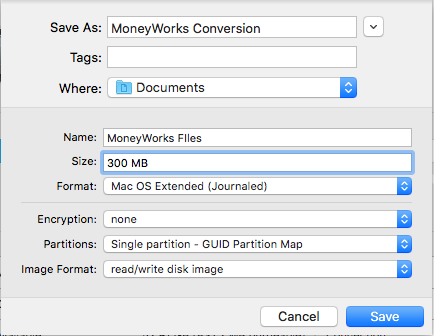
    The disk image you are making is just a file, so needs a name and location just like any other file. If in doubt, call it “MoneyWorks Conversion” and save it on your desktop.

  3. In the Name field, enter the name for the disk image.
    This is the name that appears on your desktop and in the Finder sidebar, after you open the disk image. “MoneyWorks Files” is suitable name
  4. In the Size field, enter a size for the disk image.
    Make this at least three times the size of the MoneyWorks files you are converting.
  5. Click the Format pop-up menu, then choose Mac OS Extended (Journaled)
    This is the old HFS+ file system.
  6. Leave the other options untouced. Your final settings should be something like this:
     
  7. Image Settings

  8. Click Save
    The disk image will be created and mounted for you (you will see it in the Finder sidebar under devices).
  9. Quit out of Disk Utility

You should see the disk mounted under the Devices section of the Finder sidebar:
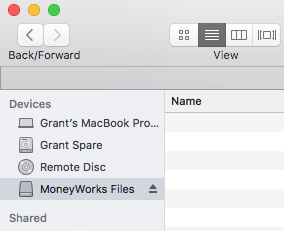
Mounted image

Copy your old MoneyWorks files onto this disk image.

Installing MoneyWorks 7

MoneyWorks 7 is available from the Try page on the Cognito Website:

https://cognito.co.nz/download.php

Fill out the form, ensuring that you choose the correct version of MoneyWorks 7 from the pop-up menu (these are all marked as Obsolete):
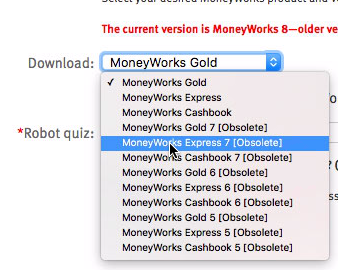
Choosing Obsolete Version

The actual download link for the installer will be emailed to you. When you receive the email click the link to download the installer, then run the installer to install MoneyWorks 7 (this will over-write any existing copies of MoneyWorks).

Note: If you have previously installed MoneyWorks 8, you will need to delete it (or rename it) before installing MoneyWorks 7. This is because a MoneyWorks 7 install will not overwrite an existing MoneyWorks 8 installation.

Upgrading your files to MoneyWorks 7

Start MoneyWorks 7 (you can just run it as a trial copy, no serial number is required — if prompted for a serial number, select the “Demonstration mode” option), and click the “Open Other” button.

In the file open dialog, navigate to the HFS image (or the external HFS drive) and open the first of your old MoneyWorks files.

MoneyWorks will ask you if you want to convert it (you do), and then ask you where to save the newly converted file. Save it on the same HFS image (it will default to your Documents folder; as this is not compatible with MoneyWorks 7 you must select the HHS image/drive).

Close the converted file, then repeat for all other old files.

Upgrading to MoneyWorks 8

Having converted all your files to MoneyWorks 7 format, you can now convert them to MoneyWorks 8.

Start MoneyWorks 8 (you may need to re-install it), and, using the “Open Other” button, open and convert each of the MoneyWorks 7 files. When prompted to save, you should save it back onto your normal hard drive (as MoneyWorks 8 will work fine on the new APFS file system).

If you have existing Custom Plug-ins, remember that these must be in the same directory as the MoneyWorks file, so you might want to save the new MoneyWorks 8 files into the same location as your original MoneyWorks 5 files (assuming this is somewhere sensible, and not in our Applications folder).

Once all the files are converted to MoneyWorks 8, you can unmount the disk image and discard the disk image file (that was the file we suggested be called “MoneyWorks Conversion” and saved on your desktop).

Posted in FAQ, File Conversion | Comments Off on Upgrading a MoneyWorks 5 or earlier file on MacOS High Sierra

Change History for 8.1

Performance improvements, tweaks, new scripting functions, and bug fixes

8.1r1

11 December 8.1r1 fix for Gold/Datacentre 8.1

  • Gold/Datacentre 8.1 could display incorrect cost values for non-inventoried products in the margin display of sales transactions

8.1

7 December 2017

  • Datacentre: Include Unposted no longer fails due to unposted transactions being open for modification (in the case of Account Enquiry, this failure would be silent). It is, however, now possible for an unposted transaction to be partially included if changes to it are saved during running of a report (this is highly unlikely though, and considered the lesser of two evils)
  • Fixed a rare server crash in Bank Reconciliation finalisation with a slow network. Also slightly improved performance for good measure
  • Datacentre: Nightly save and backup for a document that is held open continuously overnight now moves the backup to the configured backups location as expected (Mac)
  • Age by Due Date report: Added breakdown by categories
  • An unfinished progressive Find in a list is now cancelled when you double-click a record in the list to modify it (actually any of Modify, New, Delete, Duplicate)
  • Fixed several issues with bank statement import and coding
  • Bank statement import now offers to open periods if necessary (if single-user mode is available)
  • Datacentre: Improved performance of bank statement import — especially evident on a high-latency network
  • Datacentre: Improved performance of transaction validation and saving — especially evident on a high-latency network
  • Datacentre: Improved performance of inventory transaction saving — especially evident on a high-latency network
  • Deleting a selection of transactions is now stoppable
  • Database tweaks to support future functionality
  • Stock History Report updated: Fixes error if run using selected locations and highlighted only
  • Scripting: Fixed crash when 4th parameter to Insert[Edit]ListObject function is not text type
  • Scripting: GetCodeField function now works properly for Name codes (supplier type parameter was not being received)
  • Scripting: Allow changing of current tab in product/job/name entry when exiting a field
  • Scripting: Scripts may replace Jobsheet.destranseq
  • Scripting: UI overlays now display correctly on HiDPI screens on Windows
  • Scripting: Fixed a potential crash in GetFieldValue (Mac)
  • Scripting: SetFieldValue can be used to change a tab control from an ExitedField handler
  • Scripting: Scripts can be copied to clipboard as RTF to retain syntax colouring (Mac)
  • Scripting: MakeGUID() function
  • Scripting: URLCallback calls must now be requested using a WebViewControl option
  • Scripting: Expat-based XML parsing functions XML_ParserCreate(), XML_SetElementHandler(), XML_SetCharacterDataHandler(), XML_Parse(), XML_Free()
  • Scripting: The DoReport() function may now take an optional extra parameter prefer_remote=1 to prefer running the report on the server even when latency is apparently low
  • Script editor now selects the bottom-most enabled script when opened (was selecting the preceding script)
  • Bank Reconciliation Start Over now refreshes transactions that are scrolled out of sight (Mac, cosmetic)
  • Stock History Report now accounts for Discounts on Stock Purchase Invoices
  • XML export now has the option of using .mwxml as the file extension
  • Journal Entry: Using shift-tab after entering last credit no longer sets the detail gross for that line to zero
  • Updated about box copyright date
  • Fixed drag-and-drop of images into Products (Mac, 64-bit)
  • Scripting: ReadCurrentRecordForWindow now returns correct value (as colour name) for colour fields
  • Product history list now shows transactions in colour for network clients
  • Fixed some spurious logging (Error 9) on server
  • Fixed button enabling in Order Processing dialog after selecting unbilled account
  • List printing now remembers preferred scale factor (Windows)
  • Fixed a problem with Script Editor autocomplete popup windows never closing on High Sierra
  • Form Layout dialog was not refreshing when new dimensions were entered (Mac)
  • Fixed a performance problem with syntax colouring in the script editor with very large scripts (Mac)
  • Save a Copy as Clone: Changed wording on dialog to better indicate that the balance date is end of financial year
  • Work around CURL error 35 on older Windows versions when accessing https
  • Single company Datacentre now autoselects first doc when none is specified
  • Fixed potential crash with a certain malformed search expression in a report
  • 🎶 and a kererū in kauri tree 🎄
Posted in Change History | Comments Off on Change History for 8.1

Change History for 8.0.9

Bug fixes
9 Oct 2017

  • Doing a find by typing into the toolbar search box has not been finding within the current found set like it used to. That’s now fixed.
  • Fixed insertion of serial/batch numbers using the serial chooser
  • Fixed Chain Report creation (Mac)
  • The date column may now be shown in the transaction detail entry independent of serial numbers
  • Duplicating and reversing a CI with a PPD now clears the PPD info on the credit being created
  • Converting Cashbook 7 to Express/Gold 8 now creates AR/AP control accounts
  • Trial Balance report is now much faster when showing movements
  • Trial Balance report now prints the “includes unposted” advisory in the footer. In fact any report that implements include unposted functionality using a custom control will now get this provided that the custom control is named exactly “Include Unposted”.
  • Use Default Printer preference is now remembered (Windows)
  • Updated MYOB AO export (was still picking up the accountant codes when the option was unticked)
  • Fixed failure to copy backups to external locations when certain other server software is installed on the machine. Also avoid an unneccessary move for monthly archives.
  • Scripting/CLI: -z command-line option now sends the Load/Unload and UserLoggedIn/UserLoggingOut messages to scripts
  • Datacentre backups were omitting pictures folder with sanitised company name
  • Script editor script order now reliably saved
  • Preview from Report Editor on Windows now comes up on top when preview window first opens
  • Print List: Title (if altered) is now remembered
  • The log entry for Age Debtors now stores the optional As At date in ISO order for more reliable parsing by reports that wish to use it
  • Serial numbers in a Quote now transfer to the Job budget
  • Cashbook: Fixed missing resource error when attempting to change Fonts in preferences
  • Datacentre port range is no longer optional (since it is no longer possible to assign a port to a document using Gold)
  • Fixed slight misalignment of movements list in Account enquiry
  • Blank auto-allocation rules can no longer be entered
  • Selling an expiring batch now autofills the batch expiry date in the sale line
  • Stock transfer journal (and any new purchase) now updates a batch’s expiry date when a new date is supplied. This can be used to correct an expiry date that was previously incorrectly specified
  • Scripting: New function FindRecordsInListWindow(winRef, searchExpr) to apply a search to a list window programmatically
  • Jobsheet Analysis and Activity fields may now be changed on processed items using the Replace command (or ReplaceField function)
  • Fixed occasional truncation of long product codes in orders
  • Fixed lower limit on stale client time in Datacentre advanced settings
  • Reduced the instances of transactions being delete-locked
  • Scripting: ReadCurrentRecordForWindow funciton now returns 0 for sequencenumber for new and duplicated records
  • Updated Open-Item statements: Correct to use last “aged at date” where provided, instead of the date the ageing was done
  • Age by Due Date report: Fix zero suppression in right hand column
  • Cancelling serial chooser no longer allows invalid value to be accepted in serial cell
  • ApprovedBy fields are now cleared on a duplicate order/transaction
  • Detail line date column can now be shown independently of serial number column
  • You read the release notes! have a cookie 🍪
Posted in Change History | Comments Off on Change History for 8.0.9

Change History for 8.0.8

Datacentre client update fix
1 Sept 2017

Apologies, but we have discovered that Datacentre 8.0.7 was delivering a beta Gold 8.0.8 client update for some users.

  • Fixed Datacentre client updates

Also:

  • Fixed chain reports crash when run on server
  • Scripting: Extended the picture object to hold a PDF on Windows

see also: Changes in 8.0.7

Posted in Change History | Comments Off on Change History for 8.0.8

macOS High Sierra compatibility

For the first time in over 30 years, the newest Mac system software comes with an all-new filesystem: APFS (replacing the venerable HFS/HFS+, which has been around since 1985). While it has some advantages, APFS drops support for certain filesystem features that Mac applications such as MoneyWorks have been relying on for over 25 years. That has required some under-the-hood changes to the way MoneyWorks manages files. These changes were made in v8.

MoneyWorks 8 on High Sierra : ✅

MoneyWorks 8 has full support for APFS

MoneyWorks 8 on Mac is able to run from and open files on APFS-formatted SSDs or HDs as well as HFS+ formatted ones. As an added bonus, the changes made to support APFS also allow it use files stored on FAT32 and SMB volumes (although we strongly advise against doing so). When you upgrade your SSD-equipped Mac to High Sierra, your SSD will be converted from HFS+ to APFS, so please make sure you are running MoneyWorks 8.0.7 or later before upgrading your Mac to macOS High Sierra. Should any new compatibility issues be discovered with High Sierra, MoneyWoks 8 will receive updates to address them as necessary.

MoneyWorks 7 on High Sierra : ⚠️

MoneyWorks 7 and earlier cannot use files stored on APFS-formatted drives

Although MoneyWorks 7 will run on High Sierra (with some issues), it cannot access MoneyWorks data files that are stored on APFS volumes, and since the High Sierra upgrade process will convert your SSD to APFS, you will not be able to open files. If your Mac has an old-fashioned spinning hard disk instead of an SSD (or a Fusion drive), the High Sierra update will retain the HFS+ formatting, so will not cause any serious incompatibilities with MoneyWorks 7 that we are aware of.

What will happen if I try to open a document on an APFS volume using MoneyWorks 7 or earlier?

Before opening a document, MoneyWorks tests the volume to make sure it supports the API that Apple previously recommended for safe-saving of data. Apple chose to drop this API for APFS. This results in the “Error -123” alert (indicating Wrong Volume type).

If you are on MoneyWorks 7 or earlier and wish to use macOS 10.13 High Sierra on your Mac, we urge you to upgrade to MoneyWorks 8.

If you do not wish to upgrade your MoneyWorks, you can run MoneyWorks 7 or earlier on an HFS+ volume by partioning your SSD, by using an external hard disk, or by creating an HFS+ writeable disk image. Since your boot drive would still be APFS you will get some other side effects due to APFS’s change to non-alphabetic directory ordering (your Reports menus will be in random order and the Navigator panels will be in random order).

Posted in Uncategorized | Comments Off on macOS High Sierra compatibility

Change History for 8.0.7

Bug fixes and additional scripting functionality
Recommended for all users
30 Aug 2017

Notice for Datacentre clients: We’ve issued a Datacentre 8.0.8 update to address some problems with client updates that were present in Datacentre 8.0.7. If your server is running Datacentre 8.0.7, please ask your server administrator to update it to 8.0.8.

  • Fixed Batch/Serial entry from the serial picker (broken in 8.0.6)
  • Transaction type toolbar icon width is scaled properly o Windows HiDPI
  • Optimised drawing of editable lists (in general, but partcularly helps when carat is being animated on Mac)
  • Disable Customise List View in Product Inventory Location list because it is not customisable
  • Additional validation of per-user preferences that may have been corrupted on upgrade
  • MYOB AO export file modified to pick up the accountant codes for the departmentalised accounts
  • Mac alerts will no longer risk a stale disconnect if the server stale client timeout is set to a minute—you shouldn’t do that anyway
  • Fixed truncation of overlong unicode input
  • Fixed Document Preferences glitch when the previously-set WIP account no longer exists
  • Prevent changing or deleting an in-use default WIP account code
  • Scripting: Approvedby1 and approvedby2 fields are now script-mutable
  • Scripting: Scripts may now mutate UserNum, UserText, TaggedText, ApprovedBy1 and ApprovedBy2 in Posted transactions. Alos, setting values for these fields via WriteCurrentRecordForWindow in the Validate handler will force an After phase and saving of the record even if no other fields have been modified.
  • Added serialTrackingEnabled global variable
  • Added detailDateColumnEnabled global variable
  • Scripting: User entry window overlay now properly sets the width of the window
  • Scripting: User entry window now receives ItemHit messages
  • Scripting: Fixed parsing of multiple safe paths in the preferences
  • Scripting: GetFieldValue now returns the current URL from webview
  • Scripting: Fixed an issue with programmatically filling in a serial number from an ExitedCell handler
  • Scripting: UserLoggedIn handlers no longer called twice when opening a local document
  • Improve login performance for MWNow servers
  • Bill Job: job sheet items with zero sell price were not getting correct qty sign
  • Transaction Search Box: Now supports detail full text (not just description)
  • MWNow handles uploading of new files better when the filename contains punctuation characters
  • Product list sell price was not rendering correctly on Datacentre for European number formats
  • Fix posting crash with 31 character product codes
  • Purging: Count of number of transactions not processed for GST no longer includes orders
  • Forms Designer: Fixed wiping of font styles when adding sections
  • Forms Designer: Can no longer delete every section in a form (which would crash)
  • Replace command now works for Name.Colour
  • Fixed stability problems with pasting accounts from clipboard
  • Stocktake: When stocktake adjusts serialised stock to zero, the inventory records are now deleted. If you have serial or batch items showing with zero stock, just start and stop a stocktake to get rid of them.
  • Scripting: Fixed crash associated with imported images in a picture object
  • Transacton Entry: Long tax codes(> 3) are no longer truncated
  • Fixed crash when shipping Sales order with locations
  • Fixed a resource leak when serverside reporting aborts include unposted
  • Can now convert v6 files directly
  • Fixed random crashing after importing transactions via import map (8.0.4 bug)
  • Deleting contact 1 and/or 2 now clears those contact fields in the Name record
Posted in Change History | Comments Off on Change History for 8.0.7