Change History for 8.0.6

Important bug fixes plus new scripting and analysis functionality
2 Aug 2017

  • Critical fix for indexed wildcard searches that can fail in some rare circumstances. This was related to the change to searching that prevents wildcards in data from behaving as wildcards when searching
  • Fixed crash when allocating a serial to a job sheet item
  • Fixed problem with upload of plugins introduced in Datacentre 8.0.5
  • Fix to serial number stocktake with no locations
  • Fix conversion of per-user prefs from v7 that was introducing corruption to the new pref value
  • Fixed a glitch with list scrolling on Windows when the scale factor is set to 300+%
  • Security: Executing an elevated handler in a script: privilege was not getting dropped after exitting the handler
  • Mac Window menu now displays all window names again (instead of blank menu items!)
  • New scripting handler: URLCallback(window, webviewitemID, url) handler allows your script to examine links that are clicked or redirect urls that are provided by a server
  • Overnight autosave time for continuously open databases is now randomly smeared between 23:00 and 23:30 so that busy servers don’t get hammered by simultaneous saves at 23:00
  • CURLOPT_POST can now use a read callback (the read callback will be used if a POSTFIELDSIZE and a read handler is supplied but POSTFIELDS are not)
  • Analysis reports can now access detail.location, detail.date, and detail.serial
  • New long text fields now return the full text when accessed using symbolic name (from script, expression). They were only returning the first 255 characters.
  • Scripting: CreateListWindow heading/column definition terminating newline is now optional
  • Fixed a potential crash when installing a sleep notification fails (Mac)
  • Other product record changes are no longer discarded when a product is being removed from the inventory system by unclicking We Stock It
  • Fixed a potential crash when sending email via MAPI on Windows (email recipient list parser)
  • Fixed a potential crash when using the escape key to close a window that has changes to be saved (Windows)
  • Fixed a potential crash when the server fails to provide preference information to e client (blob loading)
  • Fixed potential crash when the product entry window posts a locked.single user alert when opened
  • Scripting: ExitedField handlers that invoke UI will no longer cause a recursive call to ExitedField on the same field
  • Scripting: Fixed a potential crash when ValidateField handlers invoke UI
  • Progress window no longer causes an ExitedField on the underlying window
  • Added ExpectedLife field to AssetCat table
  • Group field in AssetCat table is now 7 chars
Posted in Change History | Comments Off on Change History for 8.0.6

Change History for 8.0.5

Improvements to stock location system and lots of bug fixes
17 July 2017

  • Fixed random resetting of some app preferences on Windows
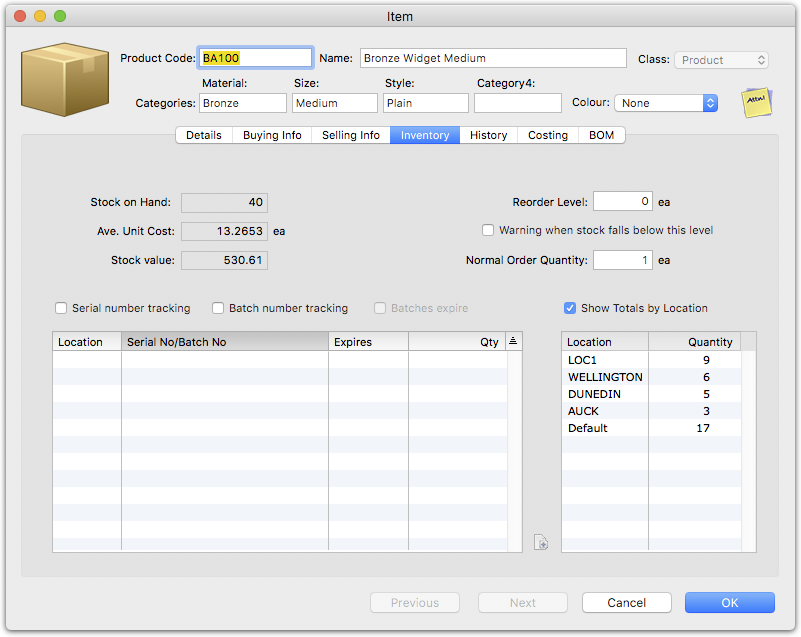
  • Stock by location: Product Inventory tab now displays quantities by location (including the default location)
     
  • Inventory Batch Chooser now adjusts display batch SOH by the batch quantity already allocated on the sale to prevent accidental allocation of the same batch twice
  • Stock By Location report added option to show values
  • Fixed SOH display for current location for sales order on Datacentre
  • Product entry screen now updates SOH live without having to reopen the product window
  • Changes to support the lack of lexical ordering of directories in the upcoming new APFS file system in macOS High Sierra
  • Improve Avoid Weekends behaviour for recurring transactions
  • Fixed truncation of long Job customer order numbers
  • Updated Statement of cash flow report
  • Removed a spurious error log entry when control characters are cleaned from fields during transmogrification
  • Product entry window resource leak fixed
  • Product entry window BOM totals now displayed correctly
  • Product entry window intermittent crash on open fixed
  • Product entry now remebers preferred tab even if you close by cancelling or close box
  • No longer try to print invoice when processing of order is cancelled
  • Process Order dialog cosmetic fix (truncated text on Mac)
  • Fixed CLI crash when opening a moneyworks://now URL that contains a document anme that does not exist on the server
  • Fixed potential crash when a remote Save is requested while the current field requires validation against the database
  • Fixed Preview window occasionally failing to display on Mac
  • Fixed intermittent failure of some intrinsic functions (such as GetBalance) in serverside reports
  • Cosmetic navigator fix (Windows)
  • Cosmetic Job entry fix (visibility of “%” label next to Billing not always correct)
  • Fixed crash when executing serverside transaction import involving an invoice “recall”
  • Fixed cursor adjustment issues making mouse tracking flaky on some UI elements on Sierra
  • Build Serialised Item: Journal now posts if one of the items is not inventoried
  • Fix potential server crash when deleting all line items from an order
  • Import() function with XML input was not returning an error properly when the import ran on the server
  • Fixed server crash when attempting to delete a category
  • Improvements to MWNow upload whitelist filtering
  • Changed message for opening a new period when entering a transaction and max periods are open
  • Fixed a buffer overflow crash in the Plain statement
  • Duplicating a product with per-location stock no longer temporarily displays the source product location stock holdings
  • Buffer overflow prevention on location store
  • GetPersistent() function now provides sequence number and last modified time
  • Fixed potential crash when atempting to access non-existent files (Mac)
  • Edit Custom Validation for stock location no longer leaves a spurious edit field behind
  • GetListHandle(): Restores the NULL-return behaviour when called for in unselected tab name in transaction entry window
Posted in Change History | Comments Off on Change History for 8.0.5

Change History for 8.0.4

22 June 2017

Performance improvements and bug fixes

CB/Express 8.0.4r1, Gold/Datacentre 8.0.4r2

  • Fixed a problem introduced in 8.0.4 with (among other things) selecting invoices for payment on Windows
  • Fixed a modality problem on Mac when a Form calls a time-consuming public script handler
  • Implemented Check for Duplicates for Sales Orders

8.0.4

  • Bank statement importing was not marking default (no rule applied) items as such
  • Stock Reorder is now much faster (especially when running on a network, but also in single user) and is also stoppable
  • Stocktake for batches now behaves properly when adding a new batch or serial in the stocktake
  • Scripting: Fixed the specific handler name for the Serial/Batch column
  • Stocktake commit is now transactioned again
  • Serial/Batch Picker: No longer omits an already allocated batch number that is still available at another location. This does mean that (for now) the allocated batch quantity will also still be able for picking even if the quantity has been fully allocated on the current sale. We plan to address this in the next update.
  • Made the Replace/Advanced Replace commands slightly faster when running over a network
  • Fixed a resource leak in stocktake finalise
  • Stocktake now runs progressively on the server, so it is much faster than v7, but it will not lock up a slow server either (which the original implementation in 8.0 could do)
  • ABN is set to not be imported in the default transaction import map
  • Added detail usernum/usertext to the std export format
  • Allow import into detail usernum/usertext
  • Scripted coach tips (using the Navigator function) are now instantiated asynchronously, so that if you display a lot of them, you won’t bog down the system window manager (excess ones will be discarded)
  • AppendPopupItems function now supports "#PER" to automatically populate period a custom popup menu with names. You can get the actual period number the popup is set to by using GetFieldValue(w, item, true) i.e. optional third parameter requests period number decoding. You can set the value with SetFieldValue(w, item, PeriodName(pernum))
  • Fixed an off-by-one affecting field length limiting for some fields on Windows
  • Category field in the Login table now properly allows 31 characters (was truncating to 7 or 8)
  • Reinstated the missing Sell column in the BOM editor
  • Fixed a typo in the Committed Stock report that threw a spurious script error
  • BOM editing was not forcing a save if you added an item but changed nothing else in the product
  • Scripting: Cell event handlers now called with correct list specific name in Transaction overlays
  • Replace with colour fields now works with “None”
  • Auto allocations rules now allow several decimal places for percentage and amount splits
  • Report Writer now warns about incorrect usage of TableGet function that would lead to severe performance degredation in a report
  • Reports/Scripts: For-loop textfile reading line length limit improved
  • Scripting: ImportImage() function was not working with a server
  • Increased maximum number of recurring transactions that will be processed in one go
  • COM ImportText/ImportFile no longer spuriously returning false. Now spuriously returns true again, for external scripts that care
  • CVE-2017-9615 Verbose logging mode on the server no longer logs REST request passwords
  • Zero contras on transfer journals are no longer omitted (this line is required to record the nominated contra account should it be needed)
  • SSL Certificate expiry dates now displayed in ISO format to avoid ambiguity when the server is in a country with an illogical date format
  • Fix a potential crash in the form printing list search optimiser
  • Fix a potential crash activating Preview window on Mac
  • Windows Datacentre installer adds firewall rules to allow server components to communicate with each other when Mordac has set the firewall to 11
  • Tweaked some Cocoa for compatibility with upcoming macOS release (10.13)
Posted in Change History | Comments Off on Change History for 8.0.4

Change History for 8.0.3

1 June 2017

See the v8.0 release notes for new features in v8.

Performance enhancements and bug fixes

  • Datacentre: Sum Selection on Sales Orders — fixed (GetTaxRate function was unavailable on the server—long story)
  • Datacentre: Serverside reporting now works for users who have an @ in their username
  • Mac: Reinstated filtering of illegal characters in tax code creation (* and + must not be used in tax codes).
  • Datacentre: The Import() function now returns the last sequence number when the import runs on the server
  • ReplaceField function return value now accurately reflects the number of records affected (so can be used to detect a replace failure due to record locking).
  • Fixed the tab order of address fields in the Name entry window
  • CLI: fixed the -r option (was not working on Mac)
  • Drilling down to a product—a relookup of product pricing is no longer forced after merely changing the history view in the product window
  • Express/Cashbook: Some icons were missing (e.g. the Printed icon in the transaction list)
  • Since more and more Datacentre users are giving their accountant an Internet login, we’ve rewritten the MYOB AO accountant export format to run on the server to make it orders of magnitude faster
  • Same for Caseware (Solution 6 not yet optimised—does anyone even use it any more?)
  • External accountant export formats are now available for all localisations
  • Scripting: AutoFillField() function can now be used for an editable list cell
  • Scripting: CheckCodeField() and CheckAccDeptCodeField() functions can now be used for an editable list cell
  • XML import: fixed stripping of returns from transaction mailing/delivery addresses and others
  • Scripting: DoReport() to “text” on Windows client connected to Datacentre was inappropriately presenting a Save dialog for the resulting file instead of just writing it to a temp file
  • Windows sticky notes now come up on top of modal windows (when the list window is maximised)
  • FieldLabel() function now returns blank for a zero Payment Method
Posted in Change History | Comments Off on Change History for 8.0.3

Change History for 8.0.2

8.0.2r2 22 May 2017

See the v8.0 release notes for new features in v8.

bug fixes

  • 8.0.2r2 Gold/DC: Fixed Accountant Export formats with Accountant’s Code (broken due to changed master export format)
  • 8.0.2r1: Fixed Accountant Export formats (broken due to changed master export format)
  • 8.0.2r1: Fixed display of certain integer fields when rendered on the server (e.g. Debtor Terms)
  • 8.0.2r1: Fixed display of “This Payment” column on Windows (was crashing into the scroll bar)

  • Prevent creation of an illegal account code (account codes must not contain hyphens—hyphens are for separating account codes from department codes).
  • Custom validations for new transaction fields were getting mixed up with validations for existing fields – fixed
  • Datacentre: Fixed failure when details records deleted while running a report
  • Gold: Stock transfer journals now balance properly on entry (previously they were corrected at posting time).
  • Scripting: Right-click on pictures in custom windows now works on Windows
  • Scripting: New sequence number is now available to scripts for a Duplicate records as well as New records
  • Scripting: Fixed crash on exit detail cell when a script opens a new window with a sticky note open
  • Scripting: SeFieldvalue: Now works for icon buttons like Post and Print in transaction entry
  • Datacentre: Running an Analysis report on the server for opening in Excel now works
  • Forms printing: unicode characters such as Ø were causing adjacent character to be omitted
  • Datacentre: Committing stocktake could time out on a slow server (fast stocktake commit will be re-enabled in a future update).
  • Scripting: The USRTEXT fields in the transaction entry window is no longer superimposed on the other user fields
  • Scripting: File_Move function now replaces existing destination rather than giving an error
  • Datacentre: Eliminate some spurious logging from the Backup process
  • Scripting: Fixed a potential crash in the Ask() function when given bad parameters
  • Gold: Prevent invalid combination of Count/Stock settings.
Posted in Change History | Comments Off on Change History for 8.0.2

Change History for 8.0.1

See the v8.0 release notes for new features in v8.

As is tradition, the big upgrade gets the usual flurry of little fixes. This list includes bug fixes from 8.0r1-r4 as well as fresh and important fixes for 8.0.1.

Important bug fixes

  • Fix loss of precision when storing and converting unit conversion multipliers for stock from v7
     
    If you buy and sell stock in different units, and converted your data file using 8.0 prior to 8.0.1, please check your Unit Conversion values. Some values may have introduced some rounding error (the unit conversion factor you enter to convert buy units to sell units is actually stored as a reciprocal, and the new database format was initially storing this with insufficient precision. From v8.0.1 more precision is used for this value)
  • Fix exporting of very small and very large numbers to XML
  • Fix issues with corruption of user settings on Datacentre
  • Fix display of disabled Next/OK buttons on Windows
  • Remember preferred stocktake control account on Datacentre
  • Fix failure to syntax colour scripts in script editor
  • Remove a spurious error code form being logged on conversion
  • Enable Itemhit script handlers for entry windows
  • Script Webviews: don’t try to open about:blank URLs externally
  • Fix file conversion on Windows (not converting the infinity for A tax code) (r4)
  • Fix Cashbook -192 error
  • Fix Bank transfer crash with long reference fields
  • Period Management: New button now remains enabled and advises when periods need to be closed
  • Fix Cashbook and Express file conversion not recognising password after conversion
  • Fix Item picture not refreshing on resize (Windows)
  • Fix cosmetic glitch in Product Entry Window on Windows after resize
  • Fix crash in receipt with writeoff on Windows
  • Fix failure to represent infinities in the database. This would reset any “All” tax rates to 0%. Please use the Tax Rates command to correct your “All” tax rate if you have one.
  • Windows Cashbook/Express installers: Set correct browser control compatibility version in registry to get standards-compliant rendering in manual viewer
  • Add missing Location toolbar icon on Windows stocktake
  • Fix and per se & issues on Windows File menu for the benfit of Windows 7
  • Fix calculated stocktake columns not displaying properly on Datacentre; also fix formatting of snapshot column.
  • Fixed setting initial count on newly created counted product.
Posted in Change History | Comments Off on Change History for 8.0.1

Important changes to MoneyWorks Gold Sharing

MoneyWorks was designed with the belief that accounting software shouldn’t slow you down. It should be fast, easy to use, immensely powerful and accessible to everyone. Innovation is at the heart of everything we do at MoneyWorks, and we constantly strive to find ways for our users to get the every best without complexity or compromise.

One thing we know from talking to our users is that the business world is experiencing an exceptional period of change at the moment. That’s why it’s a priority for us to offer solutions that keep our clients ahead, but with as little disruption as humanly possible.

Introducing MoneyWorks 8: Server technology transition.

MoneyWorks Gold is supported by an older generation of networking technology. Although many users continue to use the program, their feedback to us is that it not giving them the speed and user experience we strive to deliver. To solve this, with the release of MoneyWorks 8 we will be replacing the MoneyWorks Gold networking technology with the faster and more convenient technology of MoneyWorks Datacentre.

MoneyWorks 8: our best yet.

The debut of MoneyWorks 8 will be an exciting time for MoneyWorks Gold users as they’re introduced to features that thousands of other MoneyWorks users have enjoyed for years:

  • Faster: With Datacentre, your network performance is a whole lot better because it has performance optimisations that are not possible on Gold servers.

    • Complex reports will run much faster.

    • Quicker statement and invoice printing.

  • Easier:
    Custom reports and forms to clients can now be automatically distributed, removing the need to manually install them on each computer.

  • Built-in backup: Daily and monthly backups are automatically done for you. By using Dropbox or OneDrive, you can get automatic (and free) offsite backups.

  • Greater freedom:
    The old MoneyWorks Gold server could not be installed on a server. With the new Datacentre model, you can install it on a desktop, a server, or a cloud server (such as Microsoft Azure).

  • Accessible anywhere, any time:
    Unlike Gold, you can access your Datacentre from anywhere at any time, you just need to configure your router and firewalls. You can also access your accounts from remote devices such as iPads using the provided web apps (or make your own).

  • All users are equal:
    With MoneyWorks Gold, certain operations, such as opening a new period or changing an account code, could only be done by the host machine. With Datacentre, subject to user privileges, any user can do any operation.

  • Fairer licencing:
    MoneyWorks 8 is licenced per concurrent user, not per computer, and it can be used from any computer on your network. You only need to licence up to the maximum number of users at any one time, not for every possible user.

  • Serves multiple company files to multiple users:
    Unlike MoneyWorks Gold, the MoneyWorks Datacentre server allows different users to work on different company files simultaneously.

  • REST and CLI support:
    Unlike Gold, Datacentre has powerful APIs to integrate with other applications, both desktop and cloud.

  • Always up-to-date:
    Upgrades are included for support of latest technologies under our software maintenance plan.

There’s never been a better time to upgrade

We’re giving every MoneyWorks Gold user who wants to upgrade to Datacentre the opportunity to do so at a very special price (the equivalent to what their regular Moneyworks Gold upgrade would be).

Enjoy the first 12 months of upgrades, free

To make sure your new MoneyWorks upgrade is constantly kept up to date with the latest feature and performance updates, MoneyWorks Datacentre is subject to a 15% annual software maintenance fee (which is calculated on the retail value of your then current installation). However, this fee will be waived for the first 12 months for MoneyWorks Gold users who upgrade to MoneyWorks Datacentre.

Posted in FAQ | Comments Off on Important changes to MoneyWorks Gold Sharing

Change History for 8.0

Overview

MoneyWorks 8 is a major upgrade, requiring a new license key (unless you have a subscription license or Datacentre server with annual maintenance, in which case this upgrade is included as part of your subscription/software maintenance). These notes apply to MoneyWorks Gold/Datacentre, but where features are common to Express/Cashbook, apply to those products also.

  • New database storage format results in smaller data files. Typically 15%-30% smaller, but at the same time allows for larger field capacity
  • Bank statement auto coding expanded rules and auto-match to invoices
  • More user/custom fields and larger field capacity
  • Serial and batch number tracking
  • Greatly expanded scriptability — add custom windows and customise standard windows
  • Multi-section forms in forms designer
  • Account security levels and improved privilege control with User Roles
  • Unlimited contacts per Name record
  • Colour names per table
  • Full-service server for all: Gold server is replaced by Datacentre server with superior performance and capabilities. Everyone now gets always-on unattended server capability (and therefore internet accessibility); SSL security capability; REST API for integration with other internet applications; auto backup and archive; and much faster networking and report generation.
  • Much improved support for HiDPI displays on Windows
  • Compatibility with the APFS file system that is expected to arrive on macOS later in 2017

Revised system requirements

  • Minimum supported Mac OS version is 10.7 Lion. El Capitan or later recommended
  • Minimum supported Windows version is Windows 7. Windows 10 recommended

Forms Designer

  • Sections
    It is now easy to add additional pages to a form with completely different formatting. The principal use for this would be to add a terms & conditions page to the end of an invoice, but the general nature of Sections allows for many other possible uses. Just use the Sections popup to add or remove sections. Each new section is a blank canvas—the only limitation being that all sections have the same fundamental dimensions.

    When PDFing, all sections will be output to the same PDF file. When printed, they are collated together (contrast this with Meta-forms).

    You can also programmatically omit certain sections. In the Form Options there is a Section Skip function. You can calculate a string which contains the section numbers of sections that should not be output. E.g. a skip sections function of “23” would omit sections 2 and 3.

  • Calculated column headings in lists
    Column headings can include expressions within << and >> that will be calculated at runtime. Same as you can do with static text objects.
  • Vertical centering of list headings
    This list option will centre single-line headings within the heading region of a list object, giving a much tidier layout. If you need headings to wrap over several lines, then leave this option off.
  • Arbitrary sorting of lists
    The option of sorting list contents by one or two fields is now augmented by an option to sort by a formula. Set the Sort By popup to Calculation instead of Fields and enter a calculation, the result of which will be used as sort value for each row of data.
  • First/last-page sizing of lists
    You can define a top and bottom vertical inset for a list object wherein the top inset will be used for the first page output for the list, and the bottom inset will be used for the last page. This allows the list to take up more space on the page when subsequent pages do not have headings/logo etc at the top and non-final pages don’t have totals/footers at the bottom. To define these offsets, activate the list object by double-clicking, then hold down the option key (Mac) or Control key (Windows) and drag down from the top or up from the bottom of the object. The total size of the object will overlay the first page header objects and the last page footer objects (use the appropriate attributes on those objects to control their page visibility).
  • Free-form list data
    If the data you want to be output in a list does not correspond to a selection of records from the database (you want to calculate it on the fly), then you can use the new Calculated Row Count option in the List Records popup. This will take the numeric result of the “Search function” and output that many virtual “records”. Your list column calculations will calculate the data based on the row number. You can obtain the index (0 based) of the virtual record using the variable name index (valid within a column calculation).
  • Autosave
    The forms designer now autosaves as you work. In the event of a crash, autosaved documents are recovered at next startup.

Report Writer

  • Autosave
    The report writer now autosaves as you work. In the event of a crash, autosaved documents are recovered at next startup.

Bank Statement auto-coding improvements

  • Auto-allocation rules now allow more complex tests against memo, payee, amount and the bank account, and the split can be a a combination of percentage and absolute amounts among up to 4 accounts.
  • You can have rules that allocate receipts/payments to debtors/creditors to pay invoices.
  • You can have a general auto-pay-invoice rule that intelligently identifies whether a receipt is for an invoice and allocates it for you (based on customer code or invoice number in the statement details).

Stock serial number, batch, and location tracking

  • Record serial or batch numbers in purchases and sales
  • Record batch expiry dates
  • Per-batch or serial number stock on hand
  • Per-location stock on hand
  • Stock transfer journals
  • Product codes can now be up to 31 characters in length

Performance

  • Changes to chart of accounts structure has greatly improved performance on a slow network.
  • Timesheet entry is now much faster on a slow network.

Timesheet Entry

  • Can now be used to enter budgets.

Server

  • Network protocol now incorporates compression for reduced network traffic and faster serverside report retrieval.
  • Console now validates and displays expiry dates for SSL certificates.
  • REST server now supports HTTP/1.1, in particular the 100-continue header for POST/PUT so there is no longer a delay if you POST/PUT from an HTTP/1.1 client (previously you had to force your client to use HTTP/1.0 to avoid a delay).
  • SSL/TLS now supports Perfect Forward Secrecy which is required by some REST clients.
  • Mac Datacentre can now more easily save backups in alternative locations without having to carefully set folder permissions.

MWScript
The power and reach of MWScript has been significantly expanded.

  • Custom window designer
    You can now define custom windows for use by scripts. Custom windows can be scripted in the same way that you script the built-in windows, except because you “own” all of the controls, there are no limitations on what you can do with them.
  • More scriptability of standard windows. Symbolic names are available for controls in all windows; there are new EnterField and EnterCell messages.
  • Predefined constants
    There are predefined constants to use for functions that require “magic” numbers (such as the format number for NumToText).
  • Script Editor auto complete
    When you type more than 4 letters of the name of a built-in identifier such as a function, variable or constant name, you will get a drop-down to help auto-complete it.
  • New persistent attribute for properties, automatically stores the property value in the client’s preferences.

More…

  • Dropbox-friendly file access for single-user MoneyWorks with a document shared in a Dropbox folder, MoneyWorks will now warn you if someone else is currently using the document, to avoid “Conflicted copy”.
  • Improved online manual/help
  • WET Tax support (Australia)
  • Tax codes up to 5 characters for jurisdictions with ridiculous numbers of sales taxes (US)
  • “Mail merge” functionality when sending emails — personalise emails per recipient.
  • Much improved HiDPI support on Windows
  • Improved Outlook support on Windows—messages can be created non-modally, with email signature intact
Posted in Change History | Comments Off on Change History for 8.0

Change History for 7.3.8

Bug fixes and improvements
November 2016

  • Work around a trackpad scrolling bug in macOS Sierra
  • Update to openssl 1.0.2j
  • Improve compatibility with hiDPI displays on Windows
  • Account import to update category was not updating ledger records
  • Fixed “seq num sanity check” error when drilling down and changing an indexed field from a list sorted by that field
  • Batch Creditor Payments Next button sometimes went backwards
  • Fixed ‘VAT Number’ label missing from field name in Customer Details screen
  • Fixed a problem with negative purchase qty of job item with zero sell price
  • Updated Executive summary report
  • Fixed Daily Summary Dashboard wrong sign issue
  • Fixed spurious header account error message that could be encountered when importing journals
  • Improved numeric alignment when outputting to pdf on Windows
  • Detect circular BOM recipes
  • Fixed a report signing problem with analysis reports
  • Fixed failure to fully draw transaction entry screen on HiDPI display on Windows when initially active field is Trans Date
  • Fixed some crashiness in the history autofill for descriptions
  • Drilling down to a product and changing to certain tab views no longer behaves as if the product record had been changed (causing relookup of product info in transaction)
  • Corrected ratio calculation in Cash Flow Report

Gold/DC 7.3.8r1

  • Acme Widgets Gold sample file was broken in the initial 7.3.8 release
  • 64-bit Gold no longer needlessly asks for a relaunch when compacting large files
Posted in Change History | Comments Off on Change History for 7.3.8

Change History for 7.3.7

8 June 2016

Bug fixes

  • PositioninText() and Mid() functions now work correctly for text strings > 32 kilobytes.
  • Fixed an installation problem with the Reprint Deposit Slip report.
  • The line item margin display on transaction entry now respects the transaction exchange rate if it differs form the current system rate for the currency.
  • Updated Ledger Report to fix an issue with opening balances for P&L accounts.
  • Fixed odd highlighting behaviour in the Navigator.
  • Fixed missing Applescript dictionaries for Mac Express and Cashbook.

New

Posted in Change History | Comments Off on Change History for 7.3.7