What should I do at the End of Financial Year

In MoneyWorks there is not much that you have to do at the end of a financial year. The end of year roll-over is done automatically when you open the first period of the new year, and you can still enter information into, and print reports from, the old year.

Once all the outstanding transactions for the old year are entered into MoneyWorks (and posted), the last period in that year SHOULD BE LOCKED (use the Open/Close Period command to do this). Locking the period means that you won’t be able to inadvertently enter additional transactions into the old financial year. When your accountant has prepared the end of year adjustments (for things like depreciation), the period can be unlocked, the appropriate transactions recorded, and then (once everything has been completed), the period can be closed — closing is permanent, so it should only be done after the end of year adjustments have been entered.

Before locking the prior year, it is an excellent idea to go through and review any unposted transactions from that year. You need to ask yourself why are they there? Should they be deleted? Once you have given the results to your accountant, you are not going to want to post these, as they will change the results. Also you are not going to be able to close the year if there are unposted transactions in it, which you will want to do once the accountant has finalised the accounts. So they need to be tidied up.

If you have stock (inventory), you will need to do a physical stock take (i.e. go and count up how many of each item you have on the shelf) at the end of the last business day of the year. If you are using the stock system in MoneyWorks 6, you should turn on use the “Start Stocktake” feature to take a snapshot of your stock position as at the end of the financial year (in older versions you should run the “Stock Valuation Report”). You should also take this opportunity to review and possibly revalue the value of the inventoried items.

Once you have assembled all the information for the old financial year (see below), you should arrange for your accountant to look at the accounts, preferably at your premises where all the source documents are handy.

Your accountant is going to want to know the following — it will save time and money if you have this ready in advance of talking to your accountant:

1. Bank reconciliations: Have your bank reconciliation reports and associated bank statements at hand — accountants always want these. Note that if you are just entering the cash transactions off your bank statement instead of recording them as they happen, you will not have a record of any unpresented items (i.e. cheques or deposits made which have not been presented at the end of the financial year), so you will need to make a separate list of these.

2. Outstanding invoices: Express and Gold users will be able to use the Aged Payables/Receivables reports to do produce this. Cashbook users will have to do this manually — basically prepare a list of all invoices that you have received but not yet paid (creditors), and also a list of all the money you are owed (debtors). Remember that you will receive invoices for old financial year well into the new one, so you may not be able to produce a definitive list for several weeks.

3. Trial Balance: Print the “Trial Balance” report from the first period of the old financial year to the last period of the old financial year. Remember it needs to be printed in landscape unless you have very good eyesight.

4. Profit and loss: Print the “Profit & Loss for Year to Date” report as at the last period of the old financial year.

5. Balance sheet: Print the “Balance sheet” report as at the end of the old financial year.

6. Ledger printouts of Wages, FBT, PAYE (PAYG in Australia), Entertainment. Use the Account Enquiries command for each of these. Having entered the appropriate account code, click on the Movements tab and set the period pop-up menus to be from the first period of the old financial year until the last period of the old financial year. Then choose Print from the File menu, and set the report option to “Posted Movement by Period”.

7. Fixed Asset purchases, disposals and depreciation: Fixed assets are things like computers, cars, quality accounting software packages. If you are using the MoneyWorks Asset Register, make sure that all assets and disposals are recorded, and run the depreciation for the financial year (or, if in doubt, leave this last step for your accountant). If you are not using the register, there are a number of pre-supplied asset reports (under Reports>General Ledger) you can use to determine asset acquisitions and disposals. You can also get a list if you use the Account Enquiry command. Click the “Range of Accounts” option and set the Type pop-up to “Fixed Assets”. Then click the Movements tab, and continue as previously described.

8. Stock: If you have inventory, you will need to do a stock take (i.e. go and count up how many of each item you have on the shelf). If you are using the MoneyWorks stock system, you should set the “Start Stocktake” at the close of business on the last day of the financial year. This takes a snapshot of your stock levels and values, and you can adjust the count as the physical stock take figures become available.

If you have a version of MoneyWorks before MoneyWorks 6, the stock levels can be adjusted using Stock Creation and Writeoff journals — you will need to print out the “Stock Valuation Report” first thing on the first day of the new financial year, to show the stock that MoneyWorks thinks it has (these are the figures that you will need to adjust against). This report can be printed from the Products list by choosing Print from the File menu (and needs to be printed in landscape). If you forget to print the Stock Valuation report, it can be reconstituted later using the Stock History report (accessed in the same manner), but this will be much longer and is not quite as easy to read.

9. Work In Progress: If you are running the job system in MoneyWorks Gold, you might have work in progress to account for. As the calculation for this is based on the job sheet items in the Pending list, this should be brought up to date as quickly as possible (and possibly printed out — it is not possible to reconstitute this information later). You can use Command>Work-In-Progress Journal to create the work in progress journal, or leave it for your accountant to calculate later.

10. Bad Debts: If you have bad debts that you want to write off, these need to be done (at least in New Zealand) before the end of the financial year. To write-off a bad debt, highlight the offending invoice(s) in the Receivables list and choose Command>Adjustments>Write-off. You will be prompted for the account to write off to (you may need to set up a Bad Debts account if you don’t have one already).

11. Debtors and Creditors Reconciliation: Your accountant will want to see that the total of your outstanding debtors and creditors agrees with the general ledger totals. Use the Aged Receivable and Payables reports (formally Debtors and Creditors Reconcialiation reports) to show this.

If you have arranged for your accountant to have a copy of MoneyWorks, you can send them your entire file by using the File>Accountants Export command (which will email them a compressed copy). If your account file is large (maybe more than 25-30 MB) you might want to copy them onto a CD and post them, or use a file transfer system such as DropBox. The Accounts Export command can also be used to export your accounts in a format suitable for the specialist accountants practice packages such as Solution 6, APS, and MYOB Accountants Office.

Remember: You should have all transactions in the financial year posted before you print off any final reports for your accountant. This is particularly important for users who use the “Include Unposted Transactions” option in the Bank Reconciliation–in fact we would recommend that you turn this option off for the last reconciliation of the year. if there are any unposted transactions the old financial year, you must ask yourself why they are there.

Finally: If you have the Display filter in the transaction list window set to “Display this financial year”, remember that when you open the new financial year nothing will be displayed because there are no transactions yet in the new year. It might pay to have this set to “Display last 3 Periods” for the first couple of months of the financial year.
Posted in FAQ | Comments Off on What should I do at the End of Financial Year

Serverside transaction image recompression

It is common to scan and attach invoices/receipts etc to transaction records in MoneyWorks to avoid having to keep paper copies.

Unfortunately, scanners and cameras tend to create files are that are much much bigger than is necessary for a reasonable record of the document. This can result in the Pictures folder for an accounts document becoming very large, not to mention every full backup.

MoneyWorks Datacentre 8.1.9 and later can take advantage of 3rd party software (if installed) to recompress scanned images in uploaded JPEG and PDF files to more reasonable DPI and quality level—still readable, but not excessively large. The software necessary for recompression is not installed with MoneyWorks Datacentre, but you can install it yourself and MoneyWorks Datacentre will detect it and use it if present.

On Mac, you can install jpegoptim and ghostscript using homebrew. These are expected to be installed at /usr/local/bin/jpegoptim and /usr/local/bin/gs respectively. If these files are present, MoneyWorks Datacentre will execute them to optimise uploaded JPEG and PDF transaction images.

In MoneyWork v9.1 and later, the Apple Silicon-native paths /opt/homebrew/bin/jpegoptim and /opt/homebrew/bin/gs are used.

On Windows, jpegoptim must be installed in the MoneyWorks Datacentre directory C:\Programe Files (x86)\MoneyWorks Datacentre\jpegoptim.exe. Ghostscript 64 bit should be installed at C:\Program Files\gs\gs9.50\bin\gswin64c.exe (prior to MoneyWorks 9.1, this is the only supported gs version, but see below).

In MoneyWorks 9.1 and later, the preferred locations are gs.exe and jpegoptim.exe in the same directory that MoneyWorks Datacentre is installed in (which may be in Program Files (x86) or Program Files, depending on whether it is a new install or an upgrade from an earlier version. Since Ghostscript has the regrettable habit of changing its installation path for every version, you should create a symlink in the MoneyWorks Datacentre directory that links to the gs version you have installed.

e.g.
mklink "C:\Program Files\MoneyWorks Datacentre\gs.exe" "C:\Program Files\gs\gs9.56.1\bin\gswin64c.exe"

Recompressing already-uploaded images that are Too Big

To iterate over all images in a directory and recompress them, you can run the following on the command line on the server (assuming jpegoptim and/or gs are available). It is safe to re-run this command, since already-recompressed or already sufficiently-compressed files will not be reprocessed.

moneyworks -e "optimg dir='path-to-Pictures'"

e.g.

moneyworks.exe -e "optimg dir='C:\MoneyWorks Documents\MoneyWorks Custom Plug-Ins\Pictures for Acme'"

Preventing backup of Pictures

Even with appropriate compression, if you have many attached images, the size of the images may still make including them in the regular backup file undesirable.

If you want to exclude the Pictures subfolder for a particular company from the regular backup (and back up those files by other means), this can be done by placing an empty file named _EXCLUDE_FROM_BACKUP.TXT at the top level of the Pictures folder.

In Datacentre 9.1.1 and later there is also an option in the Console settings to only include Pictures folders in backups once a week, or never. This will apply to all companies on the server.

Posted in Uncategorized | Comments Off on Serverside transaction image recompression

Change History for 8.1.9

Bug fixes and performance enhancements
9 Dec 2019, plus Datacentre revision 16 Dec

General bug fixes and enhancements

  • Trial Balance Report: raw_data mode to support consolidation
  • Payment importing: One payment can now pay more than 255 invoices
  • Retain payment method when backing up to the beginning from last step of Batch Creditor Payment process
  • Recalculate Analysis when backing up to the beginning from last step of Batch Creditor Payment process
  • Bank Register Report: Account list is now in lexical order
  • Cash Flow Report: Include Unposted option
  • Electronic Payments: BACS format for UK
  • Retry file deletion for temporarily write-locked files on Windows (typically caused by anti-virus or backup software; this sometimes cause the autobackup in Datacentre to fail)
  • Regression fix: pasting a valid value into blank field with autocomplete was poppin up a single-value autocomplete list
  • Change to Don’t Show On Statement in Get Info was sticking to subsequently modified transactions — fixed
  • Simultaneously entering a mixture of DI and SO could show SO line item format in a DI — fixed
  • Negative quantity sale (for returns) of batch-tracked item no longer shows batch number picker
  • Load Bank Statement toolbar icons were not enabling correctly on Windows
  • Name.EInvoice field length limit enforced
  • Transaction.Transferred field for e-invoicing
  • Remove spurious “save changes” alert when quitting with an open enquiry window
  • Stepping through a selection of orders now resets the process menu setting for each one
  • Item reorder was not respecting the unit conversion for outstanding purchase orders
  • Fixed issue with importing Name with update via XML
  • Suppress duplicate refnum alert when there is no refnum

Scripting enhancements and fixes

  • Mutex obtained with GetMutex was not autoreleasing on client disconnect for Windows servers
  • Added a text field mnemonic for auto-capitalise (<ACAP>) and one to also suppress wildcard entry (<CODE>)
  • UI form editor now applies auto-size height by default for new text fields and buttons
  • Fixed context menu for Picture object on Windows (was not allowing Import)
  • #COLOUR mnemonic for AppendPopupMenuItems
  • CheckCodeField() now supports “department” codes
  • Login.usernum is now script-mutable
  • GetPlugIns can now get a list of custom forms
  • Alert function no longer interprets metacharacters
  • Fixed a potential “Illegally extended selection lock” error when using the selection passed to AllowPostTransactions in a relational search

Datacentre

  • Set a OneDrive-on-Catalina-friendly permission on backup files (A recent OneDrive update caused failure to sync files that are not group-writeable)
  • Find() function can be forced to run serverside by passing true as 6th parameter. This will generally improve network performance for scripts, forms, and other things, but it is also possible that if you are relying on an undefined behaviour of Find, you may get different results.
  • Fixed a spurious Dock icon that appeared after processing REST requests on some macOS versions with 8.1.8
  • Reports and statements rendered on the server now respect the client’s date order, regardless of the server’s regional settings
  • Mac Datacentre will now update an existing Gold on the server again (8.1.8 regression)
  • Fixed an unexpected server lock when changing a Name code
  • Deleting a transaction image now deletes the image file on the server
  • Provision for serverside recompression of uploaded transaction jpeg/pdf files (requires jpegoptim and/or ghostscript to be installed)

Datacentre 8.1.9r1 revision

  • Serverside Find optional (pass true for 6th parameter)
  • Serverside Find no longer strips embedded returns from results
  • Fixed issues in 8.1.8 and 8.1.9 with changing Name codes
  • Further fixes for spurious record locking errors
  • Fix to processing a change to a Name code and immediately hitting OK or Enter
  • Fixed some issues with serverside doreport() to text
  • Fixed a minor performance issue with network list rendering
Posted in Change History | Comments Off on Change History for 8.1.9

Change History for 8.1.8

Catalina compatibility, bux fixes, performance improvements, and scripting enhancements.
11 Oct 2019

  • Datacentre and Gold: 8.1.8r2 revision
    • Fix price code D-E sell price lookup (8.1.8 regression — discounted price code had discount applied tice when selling).
    • Remove Datacentre database shutdown delay.
    • Increase connect timeout.
    • Fix ⌘-L Calculator launching on Catalina.
    • PO receipting: Batch expiry dates not required on lines not being receipted.
    • Improve PO split-batch-inventory receipting. When a batch may need splitting, the Receive quantity is no longer autofilled.
    • Product D-E prices now display consistently in custom columns.
    • Added company ID field in Name table for e-invoicing. Note that the Bank tab in Name entry has changed to Bank and EDI. If you have script that relies on the tab name, it will need to be modified.
    • Set the default label for the 4th address line of Name records to “City”
  • 8.1.8r1 revision
    • Fix crash in autofill for stock enquiry and stock journal entry.
    • Fix inadvertent date change when double-tapping in date field with trackpad on Mac.
  • MoneyWorks Datacentre server
    • Important MacOS Catalina: MoneyWorks 8.1.8 or later is required for macOS Catalina compatibility, and on macOS Catalina you must give MoneyWorks Datacentre Console Full Disk Access in order for Datacentre to work.
    • Mac Datacentre executable bundling changed to help with macOS Catalina security restrictions.
    • Mac Datacentre Console now renders normally (Aqua UI) with Dark Mode enabled (dark mode per se is unsupported).
    • Work-In-Progress journal creation is now faster on a high-latency network.
    • Downloading large backups from the server no longer suffers from network timeouts, and backup downloads are no longer limited to 2GB
    • Adjusted network connection timeout to prevent unnecessary failures when servers are slow to respond.
    • Fixed a race condition that, in rare circumstances, could prevent new users from logging into a document.
    • Server report terse format now shows the REST setting for folders.
  • MTD (Making Tax Digital): Support for HMRC anti-fraud regime (UK).
  • Work around performance problems with building reports menu on macOS Catalina.
  • Work around broken Applescript glue for emailing on macOS Catalina. From Catalina onward, external applescript glue for emailing is no longer supported if your default mail client is Mail.app. MoneyWorks will use NSSharingService to create emails in Mail.app instead.
  • Work around self-update failure on macOS Catalina
  • New Form Signing: Signing a report or form for a Role makes it usable by any users who have that Role.
  • Fixed a bug in report word-wrapping logic with multi-byte UTF-8 characters.
  • Fixed a potential crash in tab-delim text export on Windows with 255-character field values.
  • SectionPageNum form variable no longer throws an unknown identifier error in the calculation editor dialog box.
  • Entering dates as just a day-of-month now works on Windows for any date order (previously only worked for d/m/y format).
  • Fixed a problem with loading custom reports scripts in the Commands menu.
  • Fixed an 8.1.7 regression with entering Time Sheet by Resource—the first time sheet entry line would not be fully filled out with unit and description.
  • Fix privilege issue with Product Sales/Purchase Enquiry.
  • GST Guide (NZ): Print warning on Guide for adjustments.
  • Fixed a problem with using modifier key to update order ship qties in the Process Orders dialog.
  • Fixed an issue where a custom validation list could double-validate with a maximum-length code field value.
  • Product sales/purchase Enquiry now properly differentiates privileges.
  • Fixed PDF report emailing when file extensions are hidden.
  • Fixed problem with evaluatng some expressions on the server (such as auto-allocation rules or custom columns involving ‘and’ and/or ‘or’ operators.
  • Product sell prices B-F now display properly when added to the product list. Elsewhere—for sell prices that are calculated by discounting or cost-plus method—you can obtain the final seel price by using the SellPriceForPriceCode(code) method on a product record, where code is a one-character string containing a capital A..F. (MoneyWorks automatically substitutes this for the various price code fields when you add them to a custom column. If you want the raw field value, add it as a calculated field).
  • Leaving a (modal) Preview window open with a Continue button no longer uses excessive CPU on Mac.
  • Improved label scaling for y-axis of charts when currency amounts are very large.
  • Fixed some issues with storing image formats other than jpg; Mac client no longer recompresses png as jpeg; Non-jpeg images stored on server now have correct file extension.
  • New Draftworx export.
  • New New field Jobsheet.timeProcessed is populated for job sheet entries processed on 8.1.8 and later.
  • Fixed sorting by date column in transaction detail line entry.
  • Scripting
    • AutoFillField can now use custom autocompletion data.
    • New CountElements to get the number of elements in an associative array.
    • New SetStocktakeForLocation updates the stocktake count for a product at a given location, and/or for a batch number
    • Fixed initial window draw issue in Script Editor on Catalina.
    • Updated Scintilla framework on Mac.
    • MoneyWorks Gold built-in MWScript handler for sending email. Currently this is named __SendSMTPMail, so it is not invoked by default, but can be invoked from your own SendSMTPMail handler using Built_In:__SendSMTPMail. We expect to make it the default handler in the future and remove the sendemail tool from the installation in a future version.
    • Ctrl-D now quits an interactive CLI session again (8.1.7 regression) (Mac).
    • New New functions to store properties in a window handle. SetWindowProperty and GetWindowProperty.
Posted in Change History | Comments Off on Change History for 8.1.8

Full Disk Access

Applies to MoneyWorks Datacentre server

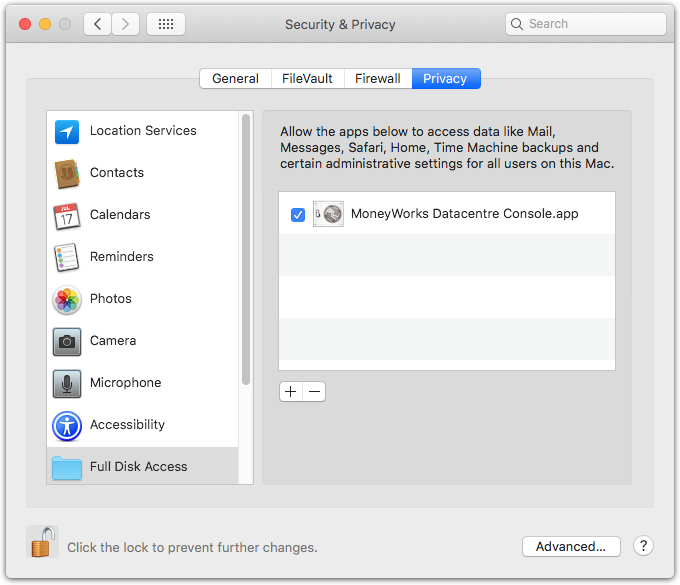
On macOS 10.15 (Catalina) and later, Apple have added many restrictions regarding what files on your Mac an application can access. These restrictions prevent the MoneyWorks Datacentre server from being able to see its own files in its own Documents folder and there is no way for the server to ask for permission to access those files (like the “Allow access to the Documents folder” gatekeeper dialog). Thus it is necessary to add MoneyWorks Datacentre to the Full Disk Access section of the Privacy System Preferences. MoneyWorks 8.1.8 bundles all of the server code into the Console app so granting access to the Console grants access to the server as well.

How to grant Full Disk Access

Sorry, but there is no way to automate this — you have to do it manually.

  1. Open MoneyWorks Datacentre Console and authenticate by clicking the lock icon.
    When you click the lock icon, the Console will check to see if Full Disk Access has been enabled. If it’s not, Console will request Full Disk Access with an alert and open the System Preferences Privacy panel to Full Disk Access for you.
  2. Click the lock at the bottom left of the System Preferences window to make changes to the Privacy settings.
  3. Click the + icon below the allow list
    A Choose File panel will open.
  4. Select MoneyWorks Datacentre Console.app in the Applications folder, and click Open.
    MoneyWorks Datacentre Console will be added to the list. You don’t need to quit the Console for access to be activated, so just click Later when System Preferences invites you to Quit the Console.

This will allow the Console app to see MoneyWorks documents in the server’s Documents folder (/Library/MoneyWorks/Documents), and it will allow the MoneyWorks Datacentre service itself to serve those documents and also to make backups in whatever backup location you configure.

Posted in FAQ | Comments Off on Full Disk Access

Change History for 8.1.7

New features and bug fixes
3 July 2019

  • Adopt “Hardened Runtime” on macOS (required for notarisation). Mac users please note that further changes will be required for Catalina compatibility, especially for Datacentre. Catalina is not due out until October, but we’re taking this opportunity to advise you not to install macOS Catalina without first checking on our website for MoneyWorks compatibility
  • Mac installers notarised for Gatekeeper on macOS Mojave and later
  • SMTP password in App preferences may now be up to 255 characters (allowing for SMTP passwords that are actually API keys)
  • Support for RBC QFX bank statement format, which has excessive whitespace
  • Bill-of-Materials report: Updated to include Memo
  • Job Sheet Memo now allows 1020 characters (up from 255)
  • Job Sheet Activity code now allows 31 characters (up from 9)
  • Transaction importing now supports separate descriptions for hard-coded detail lines in the import map (first line was getting blank)
  • Transaction importing now flags empty tax code as an error
  • Fixed garbage in account name when order processing unbilled account choices is cancelled (cosmetic)
  • Units field can now display all characters of 5-char units
  • Stepping through Creditor Partial Payment dialog now reselects text in the pay amount field
  • Fixed PDF manual failing to install on Windows
  • Fixed screen refresh failing in the Navigator and when switching between SOH and Avail display in a Sales Order (bug in macOS Mojave 10.14.4+)
  • Duplicating a transaction now clears the emailed field in the duplicate
  • Fixed typo in the post-Windows-upgrade registry repair alert
  • Cashbook: NZ GST Guide now included again
  • Transfer Funds: reference number no longer double increments
  • Fixed potential crash in bank statement import auto-coding
  • Support for Append Salesperson in Deposit products
  • Fixed overlaying of cells on a report heading part that is non-blank. The cells now properly overlay the heading text, rather than obliterating it.
  • Duplicating a user now clears the duplicate’s email address
  • Printing lists to email now remembers last Subject instead of taking it from the report title
  • Stock Valuation Report: Apply unit conversion to replacement value calculation
  • Trial Balance to Date Report: Exclude prior period balance for first period of a financial year
  • Bill Job: Separate department of miscellaneous items account when carrying forward unbilled balance
  • Slightly inexact zero stock values and quantities (due to rounding) are now clamped to zero on posting
  • Diagnostic correction to inexactly zero stock values

MoneyWorks Now clients

  • Failover to backup login gateway server now happens more quickly

Datacentre server

  • Serverside analysis with ask for search code now works
  • Datacentre subscription now autodetects an increase in the number of concurrent users for the subscription
  • Further fix to PostedBy for serverside posting (was sometimes getting blank)
  • Fixed a problem with DC service crashing when the TCP port of a previously crashed data server is reused
  • Improved stability and resilience of REST API server. This should eliminate spurious “Too many concurrent connections to server” errors.
  • Improved stale client disconnect behaviour
  • Datacentre REST URLs may now have a ? instead of a / to delimit parameters from endpoints
  • Security improvements

Scripting

  • New Regex_Replace function, replaces text in a string that matches a regular expression.
  • New Regex_Match function, returns a boolean indicating if a string fully matches a regular expression.
  • New Script hook for custom SMTP implementation: SendSMTPMail handler can be used to override default SMTP emailing behaviour with a custom MWScript implementation (using curl; see this article on the Developer pages for an example)
  • New Added DateFormRFC2822 time format (primarily because it is needed for SMTP)
  • Increased maximum number of parameters to a function and fixed crash when maximum is exceeded
  • Fixed buffer overflow in the GetAppPreference function for over-long replyTo
  • The PostedTransactions handler now runs asynchronously (scheduled on main event loop) to prevent scripts from creating a deadlock when transactions are posted as part of another operation (such as cancelling transactions or order processing)
  • Fixed potential crash on Windows when script sets serial number in journal entry
  • foreach in textfile no longer strips tabs (or other non-newline control characters) from the end of lines
  • SetListContents now checks type of second parameter (eliminating crash if non-text type passed)
Posted in Change History | Comments Off on Change History for 8.1.7

Change History for 8.1.6

New features

  • New Online filing of GST Returns (NZ) and VAT Returns (UK)
  • In New Zealand you will find a new command at the bottom of the Commands menu: IRD Connect…; in the UK there will be an HMRC Connect… command. These allow data from a previously run GST/VAT report to be uploaded using your IRD/HMRC login credentials.

  • New QR Code generation in forms and reports
  • The barcode Picture type on a form or the barcode cell type in a custom report may contain the text qrcode: followed by data to be encoded as a QR Code. The size and type of encoding is determined automatically to suit the data you supply.

Bugs fixes and improvements

  • Product list Find box now includes product serial numbers in the search
  • Buy Unit in Product “Buying Info” was truncating units to 3 characters (5 are now allowed)
  • SMTP emailing no longer formats the email address with angle brackets if the address contains a comma. This makes it possible for a single contact to have 2 email addresses in the email field
  • Cashbook: Fixed exception when stepping through auto-allocation rules
  • Fixed preset search in Analysis reports
  • Enable importing memo field into build table
  • Window title for form errors window was incorrect
  • PostedBy now set correctly for non-electively posted transactions
  • Fixed out-of-memory error in Save A Compacted Copy
  • Fixed an issue that could falsely report a problem with currencies when setting exchange rates on a slow server. Also improved progressive posting performance generally.
  • “Decimal” alignment of integers in report cells is improved
  • Custom log “Memo” entries (option key in Log window) now populate the 3 log info fields explicitly
  • Custom Report Controls: Popup menus now scale properly on HiDPI screens on Windows
  • Relational searches of the form [Transaction.keyfield.search][Transaction.otherkeyfield] now work as you might expect
  • Mac version can now open files on SMB volumes (even though you should not do this because it is a Bad Idea)
  • Scripting
    • Transaction and user key images in forms: The “product” Picture object may optionally contain transaction:seqnum or key:keyval (or product:code). If there is no prefix, then then a product code is assumed.
    • MWScript: LogMemoImmutable function
    • MWScript: LoadScriptFile function can load an ephemeral script from a file (either a .mwscript text file or a .mwblob archive of scripts)
    • Autoremoval of commands installed by InstallMenuCommand or from the Scripts folder now does a better job
    • Save script as XML now respects the script’s current enabled status
    • Activity code and Analysis labels on the Job Sheet Entry window now have symbolic references for scripting
    • The JSON_Get function now supports booleans
    • File_Open now supports CACHE/ and TMP/ filename prefixes when creating files for writing. The location will be a private cache folder or a temp directory.
    • Fixed several issues with forced loading of document scripts in command-line mode.
    • Fixed Pad function sometimes padding with a random character when no pad character supplied
    • Custom lists created with InsertListObject no longer receive continuous ItemHit messages while the mouse is held down down. One ItemHit will be sent on mouseup. The old behaviour can be achieve using a mode of fListMode_ContinuousItemHit.
  • Changed custom validation identifiers for name.bank/salesperson because they were colliding with Name.custom5/6.
  • Fixed a crash on windows when printing product labels for products with barcodes
  • Fixed a clipping issue with y axis labels in report charts
  • Stay Connected alert was broken. Fixed it.
  • Order importing no longer reports error when both freight and order total are supplied
  • Security level filtering is now applied to product and name balance history lists
  • Page setup/size/orientation is now transmitted to the server for paginating serverside analysis reports
  • Other internal fixes (0008512)
  • Work around Cocoa update bug in macOS 10.14.4 That affected Navigator redraw
  • Stocktake was not updating the list when changing the stocktake location (Datacentre)
  • Stock Enquiry: fixed a performance issue with the stock history on high latency network
  • Batch tracking can now be re-enabled for products for which it was incorrectly turned off, making inventory and stocktake inconsistent
  • REST worker processes/CLI no longer crashes when making a request when the database is temporarily locked for an extended period
  • Bank Reconciliaiton UI now allows for over 32767 transactions per statement
  • Improved transient filesystem error handling while closing a document on Windows (retry for more types of errors)
  • Bonjour browser password autofill refills correct password on change of selection
  • Updated to and fixed issues with 10.14 SDK (Mac)
  • Fixed recent URL shortcut login for older MoneyWorks Now documents (created pre-v8)
  • VAT Guide supports Making Tax Digital (UK)
  • 1099 (US) statement form added to Express
  • Fixed some misformatted diagnostic errors
  • Fixed a concurrency issue where Batch Creditor payment electronic export could potentially select extra transactions for export
  • New diagnostic repair to fix inventory for non-serial-tracked stock that has had serial numbers used in transactions
  • Fixed flaky object resizing in forms designer on Windows
  • Improved window sizing behaviour on Windows when the screen aspect ratio has changed
  • Fixed mouseover highlighting in Preview on Mac
Posted in Change History | Comments Off on Change History for 8.1.6

Tracking Grants and Events in MoneyWorks

It is not uncommon for not for profits (such as sporting clubs, schools, charities) to get some sort of grant from a parent or government body, and need to monitor or report on how the funds were allocated. Similarly the organisation might run an event, and want to track its profitability.

This can be easily done in MoneyWorks by using Job Tagging, a feature that is available in all MoneyWorks products (even MoneyWorks Cashbook). Basically this provides an additional column in the transaction entry window for a job code, allowing you to tag relevant income and expenses to a job, which represents the grant or event.

Job column in transaction window

The job allocations can then be summarised in one of the Job Tagging reports.

If you haven’t used jobs before, you need to turn Job Tagging on under Edit>Document Preferences>Jobs and turn on the Show Job Column in Transaction Entry option.

If you are using MoneyWorks Express and Gold, you can turn off the Allow any value in job column option. This means you can create a”Job” for the grant/event, and MoneyWorks will be able to validate that you are entering a valid job code (which you can’t do in Cashbook). To create a job choose Show>Jobs and click the New toolbar button. Note that each job requires a client code (on the assumption that you are going to raise an invoice for the job): in this instance you should assign the job to yourself by setting yourself up as a customer (debtor).

Whenever you receive a grant (or income for an event), you can enter the code into the job column of the transaction. Similarly when you spend money from the grant (or on an expense for the event), you record the job code on the expense line. The status of the grant (or profitability of the event) can then be seen in the Job Allocation report (new in MoneyWorks 8.1.5):

Posted in FAQ, Tip du Jour | Comments Off on Tracking Grants and Events in MoneyWorks

Change History for 8.1.5

Improvements and bug fixes
18 Dec 2018

  • Several fixes for Analysis reports that ask for a search code when run
  • Scroll wheel now works on date fields again (Mac)
  • Job sheet entries from transactions now use transaction description if the detail description is blank (v8 regression)
  • Bank statement import: Fixed a problem with importing multiple payments to the same creditor
  • Daily Summary dashboard report performance optimisation (could be quite slow with many unposted transactions)
  • Dashboard Overview Debtors graph now correctly handles foreigh currency accounts receivable
  • Fixed Find related destination views for Receipts ➝ Details et al
  • Fixed data corruption when Job Sheet item is created from a transaction with very long detail description
  • Fixed a problem with window sizing on very small (unsupported) screen sizes on Windows. I guess that means they are semi-supported
  • Holiday Updates: Holidays to 2024
  • Fixed potential crash (reported on Mojave) when canceling emailing of report
  • Age by Due Date Report: Remove fixed NZD currency label
  • New Job Allocation report
  • Fixed the initial recording of Buy/Sell checkboxes for new sticky notes
  • Fixed enabling of Reports menu subfolders after modifying Document Preferences on Mac
  • Partitioned user and system mutexes, and ensured autorelease of mutexes held by a client that loses its connection to the server (so Script Editor edit lock mutex now releases when Logged out due to idle connection)
  • Fulltext Transaction Search now includes Freight docket field
  • Updated Job detailed report
  • Fixed crash when clicking Edit for an error in an Unload script while closing document (Edit is no longer available in that situation)
  • Fixed heap buffer overflow in InsertListObject
  • Form autosave no longer generates thumbnails while autosaving
  • Fixed Memo importing
  • Added Contact Person importing
  • 64-bit update to internal Mac Console component that was still 32-bit
  • Scripting improvements and bug fixes
    • New Script editor now remembers scroll position of each script that has been edited in the session
    • Scripting: GetActiveListRow function now works for selectable lists
    • Scripting: User static text fields on transaction entry screen no longer format as numbers
    • Scripting: Fixed crash with SetListContents on an active editable list (Windows)
    • Scripting: Fixed crash with long running script that causes sticky notes to be displayed (Windows)
    • New MWScript Dawdle(winRef) handler called periodically (10 second intervals) for custom MWScript windows
    • MWScript: Fixed CloseWindow() modality failure if it executes asynchronously while a modal window is up
    • MWScript associative array keys no longer truncated to 31 characters (63 allowed).
    • Resizing in Forms and UI editor: alignment guides now align to the edge not the mouse location within the drag handle
    • Script editor autosaves all scripts periodically
    • Lookup() function works for dates/numbers in Jobsheet
    • New MWScript new function: TransferFunds(from, to, date, period, ref, analysis, desc, amt [, recAmt]). Creates a funds transfer payment between two bank accounts. recAmount must be supplied if the banks are different currencies. Each amount is specified in that bank’s currency. The return value is the sequence number of the payment transaction.
    • New Optional boolean parameter to Trim: Trim(text, true) to trim all whitespace (newlines and tabs, in addition to the normal ASCII 32 space)
    • New MWScript DateFormTimestampMacEpoch date format to get a numeric timestamp from a date/time (albeit as a string, when used with DateToText)
    • New You can get the read-only status of a record entry window using pseudo-field -3 with GetFieldValue
    • SetFieldValue no longer returns an error for overlay fields when the window is in read-only state due to the record being locked
    • Removed forced numeric formatting on T_USRTEXT fields in transaction entry window
    • MWScript: ReleaseMutex function now only allows releasing mutexes obtained by the calling client
    • New MWScript File_Path(fd) to get the full path of an open file (that was opened with a partial path)
    • Resizing a custom list column in a custom window no longer has deleterious effects on window resizing
    • Preliminary support for autoloaded script bundles
    • Find Selected (Find Again) now works correctly in Script Editor when script contains multibyte unicode characters
    • Scripting: UI Form buttons set to be disabled are now actually diasbled when form is instantiated
    • Commands added to the Command menu by scripts are now cleaned up properly when the scripts unload
    • CLI: No longer use libedit/readline when CLI stdin is connected to a pipe (since it can get into an infinite spinloop
    • CLI: diagnose command no longer requires credentials to open the file when the document is opened in read-only mode (using -oe diagnose)
  • Server improvements
    • New Datacentre: REST API for server administration. Supersedes the old web admin interface which is removed
    • Datacentre: Configurable cliSemaphoreTimeoutSeconds and cliLingerSeconds to control REST worker lifecycle
    • Datacentre: Reworked port allocation on Windows to not make connections to existing running databases, resulting in spurious SSL error log entries
    • Datacentre: Tidied up SSL connection code
    • Mac Datacentre server no longer automatically sends a shutdown advisory to running databases when the service is stopped (database servers abandon their process group)
    • Server operations that create transactions now set user initials for EnteredBy correctly
    • Datacentre Backups: Pictures folder was not backed up when company name ended with a dot
    • Serverside debtor aging was setting incorrect Aged_At date in log file when client and server were on different platforms. This would cause prolems for subsequent statements that relied on that date being stored accurately
    • Fixed the attachment name for statements generated on the server for emailing
    • REST Server: some changes to Server: header
    • Emailing server-generated statements now picks up email addresses for statements that go over one page
    • Statement form thumbnail creation (which uses live data) can now run on the server, greatly improving performance when latency is high
    • The idle-disconnect alert no longer suppresses all background redraws on Mac
Posted in Change History | Comments Off on Change History for 8.1.5

Change History for 8.1.4

Improvements and bug fixes
Aug 2018

8.1.4r1

  • Fixed a crash that affected reports with certain kinds of charts
  • Fixed a potential crash in scripts that iterate over text files when an invalid file path is supplied (Windows)

8.1.4

  • New Transdate today/remember preference is now separately settable for transactions and orders
  • New Scripting: SetTaggedValue() function
  • New Datacentre Console Broadcast All function to send a message to all logged-in users of all active databases
  • Performance Age Debtors now runs on server when latency is high for significant performance increase
  • Mac: Fixed an issue with inappropriately-enabled menu items during startup
  • Fixed budget importing to not be confused by thousands separators
  • Report/Form autosave is now invoked before testing out the report
  • Fixed APS Accountant Export format (broken by changes to transaction export in 8.0.4)
  • Fixed calculation of gross for import of orders with separate freight amount
  • Windows: Fixed positioning of autocomplete dropdowns and sticky notes on HiDPI screens
  • Windows: Fixed rendering of autocomplete on std resolution monitor when main monitor is High DPI
  • Windows: Fixed initial transaction list coming up as non-MDI (modal-style) window in some circumstances
  • Datacentre: First REST request of the month (before any user has loged in) can now auto-open period
  • Windows: Fixed sticky note rendering with HiDPI monitors
  • Fixed unexpected security level filtering in non-password-protected documents
  • Bank Rec: Fix enabling of Cancel toolbar icon in Select mode
  • Importing Sales Orders against cash customers now supported
  • Name.country fields may now be up to 63 characters
  • Windows: Fixed Cashbook/Express Outlook integration
  • Fixed Highlighted-Only control enabling in Aged receivables report
  • TableAccumulate function optimised for large tables that happen to be built in sorted order
  • Print to clipboard on Windows now putting unicode text on the clipboard
  • Job Form now allows full length of Category fields to be entered
  • Fixed filter syntax checking for Product/Name record methods such as SOHforLocation
  • Sped up startup on Windows when updating plugins (now delete old plugins instead of asking the shell to move them to the trash, which is very slow on Windows 10)
  • Pad(): now returns an error for unsupported pad lengths
  • Windows: Transfer Funds window is now correct size on HiDPI screen
  • Fixed a potential crash on Windows when resixing edit lists
  • Timesheet by Resource no longer spurious department code if the resource cost account is departmentalised
  • Uninstall option now showing in Add/Remove Programs on Windows 10
  • Auto-formatted custom columns no longer reformat numeric codes as numbers when left aligned
  • Saving invoice to PDF file now sets printed flag
  • Fixed buffer overflow in script editor with very long lines
  • QIF import no longer tries to record overpayments for foreign debtors uing the auto-pay invoice rule
  • Auto-repair missing registry keys for COM on Windows after a major WIndows 10 update
  • Emailing server-generated statements from Preview window no longer uses previous email message
  • Addressed potential for crash when exiting script handlers whose window has been closed while the handler executed
  • Fixed pasting of unicode text into Budget spreadsheet on Windows
  • Scripting: persistent property of date type now retains time granularity
  • Scripting: persistent property of text type is no longer limited in length
  • Analysis with ‘Ask for search code’ can now run on the server
  • Custom reporting: PeriodNum report variable is now available in SetupReport handler on the server
  • Selecting a department from choices list in Account Enquiry after using a wildcard to invoke the choices now inserts the selected department as expected
  • MYOB AO export now strips returns embedded in descriptions — embedded returns were preventing the file from importing to AO
  • Cashbook fixed exception in auto allocation rule setup when editing complex rules
  • Fixed potential crash in auto allocation rule setup when editing complex rules
  • 5-character tax codes now look up rate properly when changed manually in detail line
  • Full-text search: The sort order is now reapplied if the full-text search completely reasonably quickly
  • Orders now always default to today’s date
  • Increased size of index cache
  • Optimisation to Diagnostic for documents with many ledgers
  • Report writer: Fixed a crash thatcould happen when changing a for-loop with multilevel sort to a different table
  • Build Command: 8.1.3 was not calculating the new the cost price for built items
  • Stock units longer than 3 chars no longer being truncated
  • Tax Codes longer than 3 characters no longer being truncated (or failing to look up rate when manaually changed) in some entry screens
  • Auto fill for departmental accounts now shows department options after pressing hyphen key
  • Auto allocation rules with amount terms now remember the relational operator correctly
  • Datacentre ASP mode should not longer impose incorrect folder metering when there are stale pid files after a server crash/reboot
  • Payments History: performance improved for high latency network connections
  • MYOB AO exporter now filters inch symbols (since the format is quoted CSV)
  • Cash Flow Statement: Now includes explicitly tagged journals
  • Singapore Customer Accounting: updated reports and default tax codes
  • Custom bank statement importer scriptss may now be located in Custom Plugins as well as standard
  • AddStatementTransaction() function now applies autoallocation rules to the transaction
  • Windows Datacentre now collects service crash dumps on 64 bit platform
  • New Plain invoice—Now includes remittance advice text from Company Details
  • Datacentre Console Show Active Documents now excludes folders with no active documents to make the active ones easier to see
  • New Custom form list objects can now display data from any table in the database
  • Remote single-pass import no longer strips tabs from the rejected records file
  • Scripting: Custom window static text controls now apply formatting to numeric data
  • Sales enquiry by name was excluding cash sales in the monthly totals for enquiries executed on the server—fixed
  • Datacentre: fixed product image deletion
  • DoReport function with output to preview now works when report is generated on the server
  • Fixed flickering cursor over form list items (Mac)
  • Fixed user role window size on MoneyWorks Now
  • Demo purchase links in MoneyWorks now load secure site
  • Balances window column names now display properly on HiDPI screen on Win10
  • Fixed memory leak in APFS folder traversal
  • Job.custom5 to 8 now available on import map
  • Ask() popup title width corrected for on HiDPI displays on Windows
  • Job Detailed report settings had an underscore in Highlighted Only control for no good reason
  • Default login list window size is wider to accommodate all columns better
  • Login.Usertext may now be set from a script with WriteCurrentRecordForWindow()
  • Scripting: Disabled lists no longer get clicks and key events
  • Fixed receipting of full amount of invoices with non-expired PPD
  • Datacentre/REST: Additional fix to interpretation of headers with non-canonical case
  • Report charts now respect cell font/size
  • Fixed typo in subscription expiry alert
Posted in Change History | Comments Off on Change History for 8.1.4