MoneyWorks Maintenance
MoneyWorks Maintenance was introduced to MoneyWorks 9 to replace the old upgrade process. Industry wide, software maintenance has largely replaced the old fashioned software upgrades for very good reasons. From a user perspective there is certainty in the ongoing running costs of the software, and the hassles of new serial numbers and file upgrades largely disappear. From a MoneyWorks perspective, we will be able to provide continuous improvement and new features without the choke point of new version upgrades1.
For MoneyWorks Gold and Express2, software maintenance is charged at just one percent per month after the first twelve months. This is payable annually in-advance, and commences on year after purchase (or upgrade, if you are upgrading from an older version of MoneyWorks).
When MoneyWorks detects that your software maintenance is due, it will prompt you to renew it.
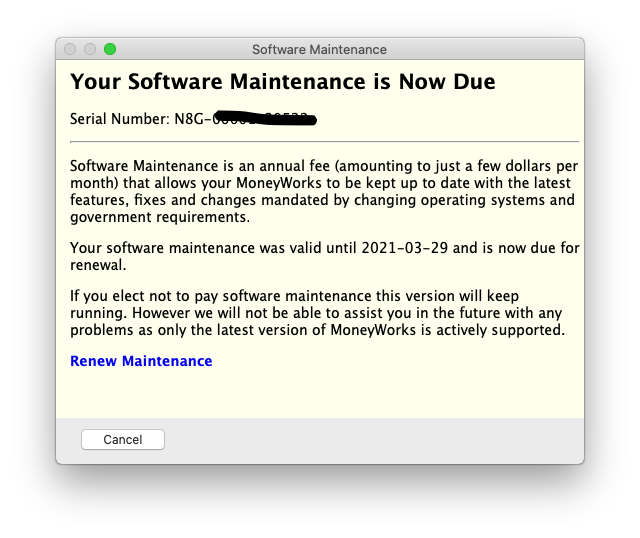
Click the Renew Maintenance link to start. You will be shown the amount and asked to check/update your registration details. You will then be able to enter your credit/debit card details via our payment provider Windcave. This card information is not stored.
If you have lodged a credit card for MoneyWorks Services against the MoneyWorks file that you have opened, you have the choice of charging the renewal to the stored card or charging a different card.
If you don't renew your annual maintenance:
- Your current version of MoneyWorks will keep running fine, but you will not be able to get any additional updates until the maintenance is renewed.
- You will be prompted every so often to renew (these things are easy to forget).
- We may not be able to help you if you have issues. Only the current version of MoneyWorks is supported.
- If you are using any MoneyWorks Services, these may stop working at some stage in the future (possibly with inexplicable error messages). MoneyWorks Services are continuously improved and may use new features not available in older versions.
1 In the almost thirty years since MoneyWorks was introduced, there have only been eight product upgrades. Each of these was significant, but an average of three and half years between upgrades is just too long. ↩
2 Software maintenance for MoneyWorks Datacentre is charged differently, and is 15% per annum. ↩