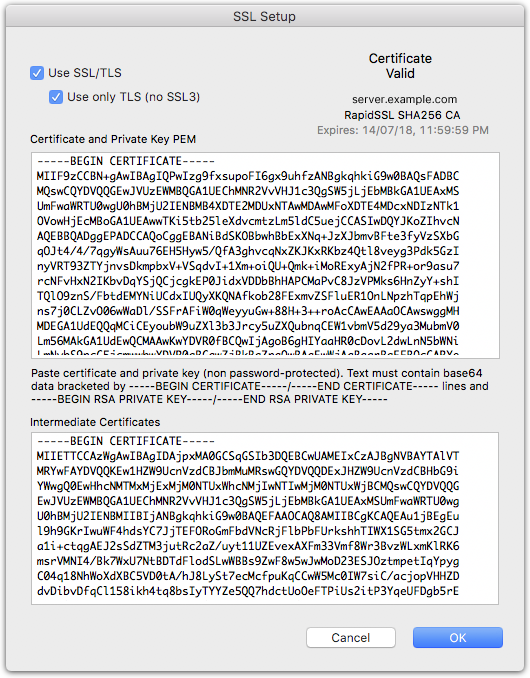
Enabling SSL encrypted connections
To enable SSL encrypted connections, you will need to install an SSL certificate on the server.
Obtaining an SSL certificate
Generate a private key for your server, and a Certificate Signing Request.
If you have openssl available on your computer (i.e. if you are using a Mac, or Windows 10 with a WSL linux distribution installed), here are the commands that you can enter into Terminal to generate these using openssl.
- Create a directory for the files
mkdir MyCertFiles
cd MyCertFiles
- Generate the private key and csr.
You will need to fill out the details for your certificate, the most important one being Common Name. This will be the Fully Qualified Domain Name for your server (e.g. yourserver.yourcompany.com). If you just hit return, the default value in [ ] will be used.
openssl genrsa -out private_key.pem 2048
openssl req -out mydomain.csr -key private_key.pem -new

Country Name (2 letter code) [AU]:US
State or Province Name (full name) [Some-State]:California
Locality Name (eg, city) []:San Francisco
Organization Name (eg, company) [Internet Widgits Pty Ltd]:My Company
Organizational Unit Name (eg, section) []:
Common Name (e.g. server FQDN or YOUR name) []: yourserver.yourcompany.com
Email Address []:

Please enter the following 'extra' attributes
to be sent with your certificate request
A challenge password []:
An optional company name []:
This will generate a private key that is not password protected, so it will be installable in the server as-is.
- Open the directory in the Finder
open .
- Submit the CSR file to your chosen Certificate Authority
They will provide a .crt certificate file. If asked what kind of server you have, just specify apache/openssl (this should get you a .crt pem format certificate).
Installing the SSL certificate
Your certificate should be in the form of a PEM text block (starts with ——-BEGIN CERTIFICATE——-)
Your private key is in the form of a PEM text block (starts with ——-BEGIN RSA PRIVATE KEY——-)
- Open thes certificate file in a text editor and copy and paste the text from the into the Certificate and Private Key PEM field of the SSL settings
- Open the private key file in a text editor and copy and paste the private key after the the certificate block in the Certificate and Private Key PEM field of the SSL settings
Installing the intermediate certificate
Certificates from most Certificate Authorities will also require one or more Intermediate Certificates to complete the Chain of Trust to a trusted root known to the operating system that clients are running. These certificates will be downloadable (or copyable) from your Certificate Authority's website. You should have received a link to them along with your certificate.
- Open the intermediate certificate bundle (usually called CA Bundle) in a text editor and copy and paste the text into the lower field of the SSL Settings dialog box.
The SSL Settings dialog should display "Certificate Valid", along with the issuer and expiry date for the certificate.