Submitting your GST
To submit your GST:
- Review the GST information displayed in the MoneyWorks GST section of the Connect window
This is the information that will be sent to the IRD and is based on your last finalised GST return.
- If you need to make adjustments, click the Show button on the appropriate adjustment line
Entering adjustments is described below.
- If the GST information is correct, click the Submit button
You will be asked for confirmation:

Note that MoneyWorks checks that its cycle end date is the same as that expected by IRD. If it isn't, the following alert will display, and you will need to decide what to do (if you submit, it will use the period from the IRD, not that from MoneyWorks). As an example, you will get this alert if you have forgotten to Finalise your GST report since you last submitted.

If the submission is accepted, an alert will be displayed showing the IRD response code (you don't need to record this as it will be noted in Show>Log).

Note: The Submit button will be disabled once you have submitted a return.
If, in the settings, you have elected to make a transaction, this is also created. The example below is from a submission for a company on a ratio basis:
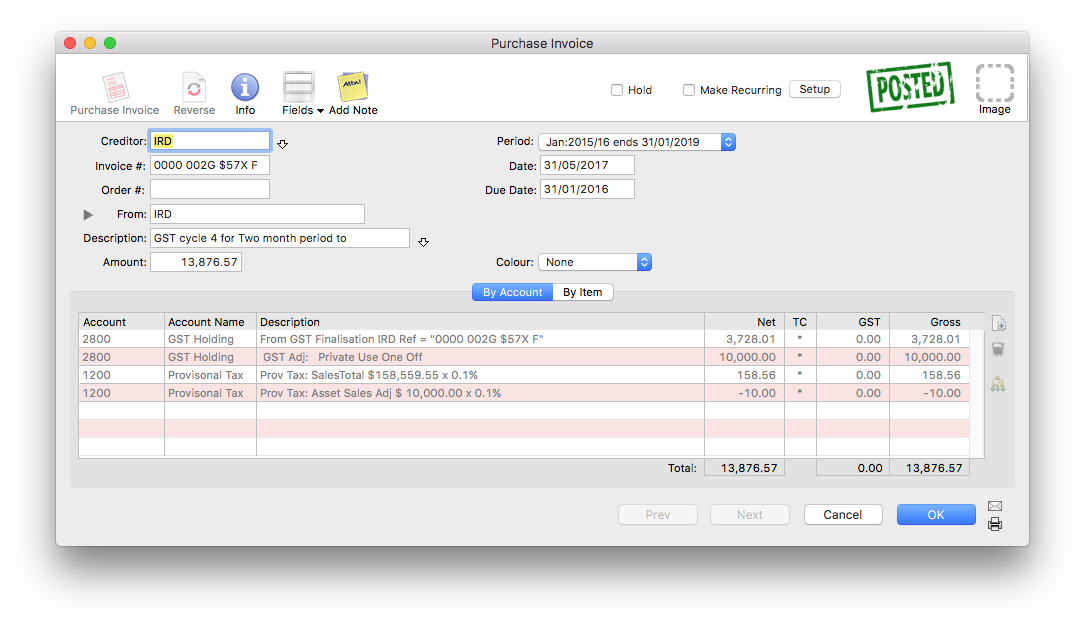
The submission might be rejected. In this case an alert will be displayed showing the reason that IRD gave for the rejection.

Clicking the Status button will retrieve the updated status. This will have changed to "Submitted" if your submission was successful.
Adjustments
If you need to include GST adjustments:
- Click the appropriate Show button on the adjustments line.
The Adjustments window will be displayed:
 Debit Adjustments |
 Credit Adjustments |
- Click in the appropriate Amt cell and enter the adjustment
- Click OK
The adjustments will be included in the numbers submitted to the IRD, and, if you have elected to generate an accounting transaction in MoneyWorks, it will be accounted for in this (coded against the nominated GST Holding account).
Important: You may have entered adjustment information when you previewed the GST Guide. This information is not carried through to the IRD Connect window and must be re-entered.
Fixing the GST information
If the GST information displayed is incorrect, you will need to fix it before submitting the return. You need to locate the incorrect transactions and cancel and re-enter them, or enter any transactions that are missing. In principle you should have done this before finalising your GST Report, however we all make mistakes!
Because your GST Report has been finalised, you will need to do a bit of additional work to get these corrections included in your GST Submission. Basically, having entered and checked and posted the corrections:
- Set the GST Cycle end date in MoneyWorks back to the end date of the last finalisation (it will have been incremented as part of the finalisation process).
This is done in Edit>Document Preferences>GST, where you reset the value of the Next cycle ends on date.
- Rerun the GST report.
This picks up all posted transactions that have not been previously processed for GST and which are dated on or before the cycle end date. In other words it should contain just your corrections.
- When you are satisfied this is correct, finalise the GST Report.
- Now re-run the GST Report, and this time click the Load Old option, highlight the two (or more, if you have been really having a bad day) most recent reports and click Use.
- To amalgamate these individual reports into a single return, turn on the Use Reprint Figures for Guide Form option, then print or preview the report.
This will be a combined report that amalgamates the data in the highlighted reports.
- If you now go back to IRD Connect, or preview the GST Guide, you should see the revised figures.
For more information on combining GST Reports see Reprinting a GST Report
Making an Amended return
If you have already submitted a GST return and realise that you need to amend it:
- If necessary, make the necessary amending transactions in MoneyWorks and rerun the GST reports, as described above
- Choose Command>IRD Connect to re-login to the IRD
Note that you will get a warning, as the current GST cycle in MoneyWorks will have a different end date that that of the IRD.
- Turn on the Amended Return check box, and state the reason for the amendment (required information by the IRD)

- Click Submit
The changed data and amendment reason will be submitted to the IRD.
Note: If, in the Settings, you have elected to create a transaction, a new transaction is created at this point. If you created an invoice, the previously created invoice will be automatically cancelled (provided it has not been paid); if you created a payment, you will need to manually cancel the original.