Entering your Opening Stock
If you intend to use the inventory system in MoneyWorks Gold, you will need to have done a stock take as at the close of trade on your Close-Off Date. You will then need to enter this, either by means of a Stock Journal or by using the MoneyWorks stocktake feature.
Using a Stock Creation Journal
Although you can specify the products as you create each line in the journal, it is a better idea to enter your products into MoneyWorks before you attempt the journal —see Creating a New Item. Remember that the buy and sell prices that you enter will be those as at your Start Date.
The opening stock is entered through a Stock Creation Journal. For ease of entry, limit the number of items in each stock journal to about 50.
- Create a new journal and set its type to Create
This is used to “create” stock out of nothing.
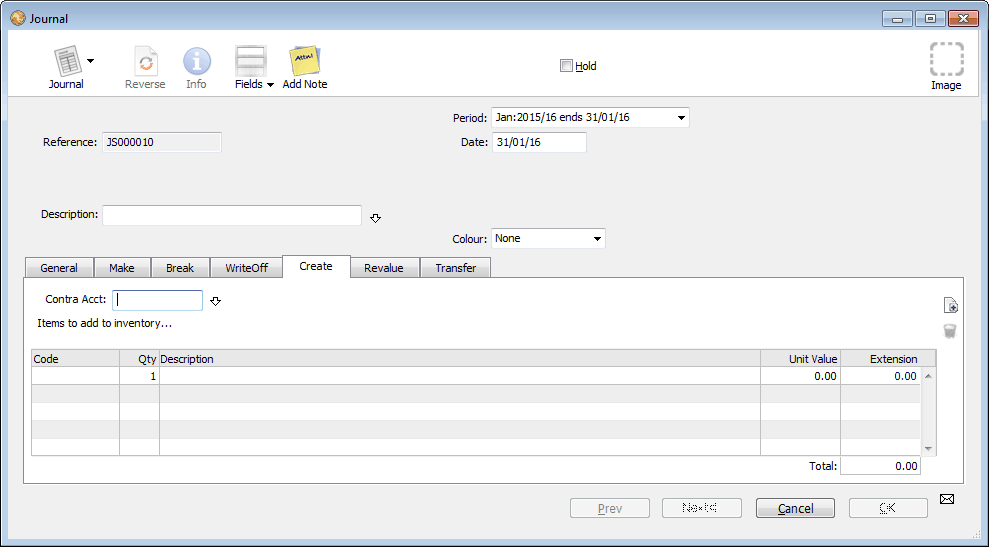
- Ensure the Date is set to the Close-Off Date
- Set the Contra Account to SETUP
If you have created a special stock setup account, set it to that.
- Type “Opening Stock” as the Description
- For each product, enter the quantity on hand at your stock take, and its unit value
Each product code will take up one detail line
You should total up the value from your stock take and compare this with the total value of the stock creation journal(s). Note that these figures are GST exclusive. The stock quantities can be checked by printing off the stock list —see Printing a Product List.
When you have checked that the stock is entered correctly, post the journal(s).
Using a MoneyWorks Stocktake
The MoneyWorks Stocktake feature allows you to enter just the quantities on hand in a list view. Points to note:
- The items will be brought into stock at the average unit value from the product record (or the last Buy Price, if there are no items in stock as in this case). You must ensure that this price is correct;
- The stock take date is the Close-Off Date;
- For the special case of setting up only, the stock adjustment account will be the inventory account (a current asset). Normally it will be an expense/cost of sales account.